Vendor Certificate of Insurance Tracking: How to Manage COIs and Renewals
Vendor insurance certificates can expire without warning, leaving businesses with outdated records and unanswered coverage questions. Learn how to build a COI tracking process that identifies missing documents, monitors renewals, and keeps vendor insurance requirements organized.
 18 min read
Your company hires a cleaning contractor, a maintenance provider, a delivery company and an IT services firm.
Each vendor has different responsibilities. Some work on your premises. Others handle valuable equipment, transport goods or provide professional services.
Depending on the work involved, your contracts may require these vendors to maintain particular types and levels of insurance.
Before work begins, you collect their certificates of insurance.
The documents arrive by email, get saved in a shared folder and are rarely reviewed again.
Six months later, a question comes up: Which vendors have current insurance certificates, which are approaching expiration, and which have never submitted the required documents?
If answering that question means searching through emails and spreadsheets, your vendor insurance tracking process needs improvement.
Certificate of insurance tracking helps businesses organize vendor insurance requirements, review supporting documents, monitor policy expiration dates and follow up when updated evidence is needed.
This guide explains how to build a practical COI tracking process, what to check on an insurance certificate, and how to keep renewal responsibilities visible.
What Is a Certificate of Insurance (COI)?
A certificate of insurance, commonly called a COI, is a document that summarizes information about an insurance policy.
It typically identifies the insured business, insurance provider, types of coverage, policy numbers, coverage limits and effective and expiration dates.
Businesses frequently request COIs from vendors, contractors and service providers as evidence of insurance.
For example, a facilities management company may require a maintenance contractor to provide evidence of commercial general liability insurance before beginning work.
The contractor's insurance agent or broker may issue a certificate summarizing the relevant policy information.
The company can then review that document against its contractual insurance requirements.
However, there is an important limitation.
A certificate of insurance is not the insurance policy itself.
The New York Department of Financial Services explains that a COI summarizes information about an underlying insurance contract but cannot create additional rights or expand the coverage provided by that contract.
The Texas Department of Insurance similarly explains that certificate information must remain consistent with the policy.
This means collecting a certificate is only one part of managing vendor insurance requirements.
Businesses may also need to review endorsements, confirm policy information and determine whether the coverage satisfies their contractual needs.
Why Vendor Certificate of Insurance Tracking Matters
Vendor insurance requirements often become difficult to manage as the number of suppliers increases.
A business working with five contractors might be able to maintain their documents manually.
An organization managing dozens or hundreds of vendors may have multiple certificates, policies, expiration dates and renewal requirements to monitor.
Without a structured process, several problems can develop.
1. Certificates expire without anyone noticing
A vendor may provide a valid certificate when a contract begins.
However, the policies listed on that certificate may expire during the relationship.
Unless someone monitors those dates and requests updated documentation, the organization may continue relying on an outdated certificate.
An expired certificate does not necessarily prove that the vendor is uninsured. The policy may have been renewed without a new certificate being supplied.
Nevertheless, the organization no longer has current documentation supporting its records.
2. Missing certificates are difficult to identify
Tracking only the certificates you have received creates a blind spot.
A spreadsheet containing 50 insurance certificates does not tell you whether another 15 vendors were supposed to provide documents but never did.
A reliable tracking process must identify both existing certificates and missing requirements.
3. Different vendors need different coverage
A cleaning contractor, delivery company and professional consultant may present different insurance considerations.
The types and limits of insurance required should be based on the applicable contract, the work being performed and any relevant legal or regulatory requirements.
A single insurance checklist should not automatically be applied to every supplier.
4. Insurance documents may not match contractual requirements
A certificate might show commercial general liability coverage but omit another type of insurance required by the contract.
The listed limits may also be lower than the agreed minimum.
In some cases, the contract may require an additional insured endorsement or other policy provision that cannot be established simply by reading the certificate.
5. Responsibility for follow-up becomes unclear
Procurement may collect the initial certificate, while Legal reviews the contract and Operations manages the vendor relationship.
If nobody is accountable for obtaining renewed documents, follow-up may not happen.
A COI tracking process should identify who owns each requirement and who must resolve outstanding issues.
What Information Should You Check on a Vendor COI?
A certificate should be reviewed against the requirements that apply to the particular vendor.
The following fields are a useful starting point.
COI field | What to check |
|---|---|
Named insured | Does the insured business match the vendor or required contracting entity? |
Insurance carrier | Which insurer issued the underlying policy? |
Policy number | Is a policy reference provided for each relevant coverage? |
Coverage type | Does the document identify the required insurance category? |
Effective date | When does the listed policy period begin? |
Expiration date | When does the listed policy period end? |
Coverage limits | Do the stated limits meet the applicable requirements? |
Certificate holder | Is the correct organization identified where required? |
Additional insured indication | Is additional insured status indicated, and is supporting policy evidence available where required? |
Agent or broker details | Is there an identifiable contact for verification or follow-up? |
A certificate may list several policies with different expiration dates.
For example, a vendor's general liability policy might expire in January while its commercial automobile policy expires in April.
Do not assume that every coverage shown on a single certificate shares the same expiration date.
Track the relevant policy periods separately.
Certificate holder vs additional insured
These terms are often confused.
A certificate holder is the party identified as receiving the certificate.
An additional insured is a person or organization that receives certain insurance protections under the policy, subject to its actual terms.
Being listed as the certificate holder does not automatically make an organization an additional insured.
The Texas Department of Insurance specifically addresses this distinction in its certificate of insurance guidance.
Where a contract requires additional insured status, the reviewing team should obtain and assess the relevant policy endorsement or provision rather than assume the certificate creates that protection.
What about cancellation notices?
Another common misunderstanding is that a certificate holder will automatically receive advance notice if a vendor's insurance is cancelled.
That is not universally guaranteed.
For Texas risks, the Department of Insurance explains that a certificate cannot create cancellation-notice rights beyond those established by the policy, endorsement or applicable law.
The specific notice rights depend on the underlying insurance arrangements and governing requirements. Texas Department of Insurance
For this reason, businesses should not rely entirely on the expectation that an insurer will notify them of a cancellation.
Periodic verification and vendor follow-up remain important.
How to Build a Vendor Certificate of Insurance Tracking Process
A reliable COI tracking process should connect each vendor to the insurance requirements it must satisfy.
The following seven steps provide a practical approach.
Step 1: Create a central vendor register
Begin with a complete list of vendors, contractors and service providers whose activities may require insurance documentation.
Include active vendors, new suppliers awaiting approval and vendors whose documentation needs review.
For each vendor, record the business name, contact person, service category, responsible internal employee and current relationship status.
You should also identify the relevant contracting entity and the locations or projects where the vendor performs work.
A central vendor register helps prevent an important problem: tracking only the suppliers who have already provided certificates.
The absence of a certificate should be visible as an outstanding requirement, not an absent record.
Step 2: Define insurance requirements by vendor category
Before requesting certificates, establish what insurance documentation each vendor is required to provide.
Start with the applicable vendor agreement, procurement requirements and relevant regulatory conditions.
For example, your organization might establish different insurance requirements for facilities contractors, delivery providers and professional consultants.
Vendor category | Potential insurance requirements | What to review |
|---|---|---|
Facilities contractors | General liability, workers' compensation | Contractual limits, coverage applicability |
Delivery providers | Commercial automobile liability, general liability | Covered activities, vehicles and policy periods |
Professional consultants | Professional liability | Covered professional services and policy conditions |
Cleaning contractors | General liability and other contractually required coverage | Required limits and relevant endorsements |
Technology service providers | Professional liability or cyber insurance | Contractual requirements and scope of coverage |
These are illustrative categories, not universal legal requirements.
The actual coverage requirements should be determined from the applicable contract, jurisdiction and activities.
For example, the New York State Workers' Compensation Board explains that state and municipal entities must obtain specified evidence of workers' compensation coverage or exemption when issuing covered permits, licenses and contracts.
Importantly, ordinary ACORD certificates are not accepted as proof of New York workers' compensation coverage for that statutory purpose. Specific forms or qualifying exemption documentation are required. NYS Workers Compensation Board
This demonstrates why organizations must verify the documentation requirements applicable to their particular activities.
Step 3: Collect certificates and supporting documents
Once the requirements are established, request the relevant documentation from each vendor.
Where appropriate, obtain the certificate directly from the vendor's authorized insurance agent or broker.
Ask for supporting endorsements or policy provisions when these are needed to verify contractual requirements.
Maintain a clear distinction between documents requested, documents received and documents reviewed.
For example, a vendor record might show:
Vendor: Northwind Facilities Ltd
Required document: Commercial general liability certificate
Document status: Received
Review status: Pending verification
Assigned owner: Facilities Manager
Receiving a document should not automatically mean the requirement has been satisfied.
Someone must still review whether the information matches the organization's requirements.
Step 4: Verify the insurance information
Review each certificate for completeness and consistency.
Confirm that the named insured matches the appropriate business entity, the required coverage types are listed, the policy dates cover the relevant period and the stated limits meet the applicable requirements.
Where additional insured status or another endorsement is required, review the supporting policy documentation.
If important information is missing or unclear, contact the authorized agent, broker or insurer through an independently verified contact channel.
Do not assume that a certificate guarantees coverage for every activity performed by the vendor.
The underlying policy's terms, exclusions and conditions determine the actual coverage.
Example: When a COI alone is not enough
New York City's film permit insurance requirements provide a useful illustration.
The city's Mayor's Office of Media and Entertainment requires specified applicants to provide a certificate of insurance, broker or agent certification, and relevant additional insured documentation.
For covered film permit applications, the guidance specifies commercial general liability coverage of at least $1 million per occurrence, subject to the office's requirements.
It also requires proof of insurance to be submitted by the broker or agent at least 48 hours before the project application, with additional instructions where coverage will expire during the project. New York City Government
These are requirements for that particular permit process, not general rules for every business or vendor.
The lesson is that an insurance tracking process must account for the actual documentation and timing requirements of the relevant activity.
Step 5: Build a central COI tracking register
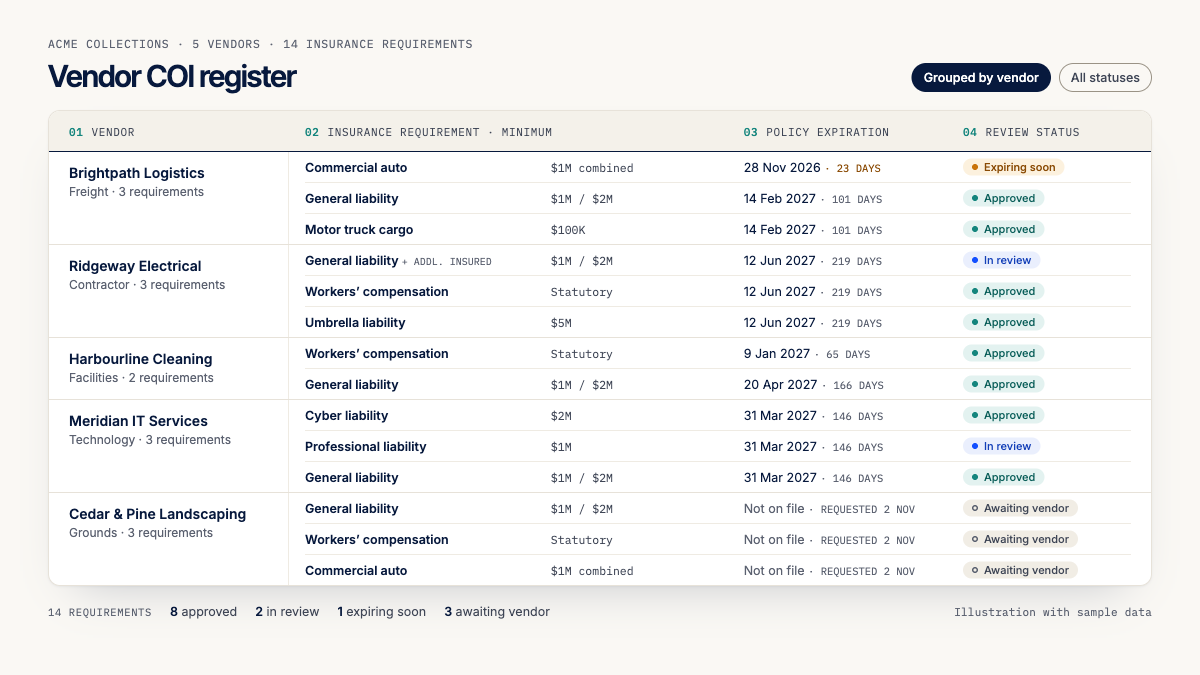
A certificate tracking register should connect the vendor, insurance requirement, supporting document and renewal status.
A useful register includes the following fields.
Field | Purpose |
|---|---|
Vendor name | Identifies the supplier or contractor |
Vendor category | Groups vendors by activity or service |
Internal owner | Person responsible for follow-up |
Insurance requirement | Required coverage or documentation |
Policy number | Reference for the underlying policy |
Insurance carrier | Insurer providing the coverage |
Coverage limit | Limit shown on the certificate |
Effective date | Beginning of the policy period |
Expiration date | End of the policy period |
Document status | Missing, received or expired |
Review status | Pending, accepted or requiring correction |
Last verified | Date the information was reviewed |
Supporting documents | Certificate, endorsements or other evidence |
Next action | Required follow-up |
For vendors with several policies, maintain separate records for the relevant coverage types and expiration dates.
This avoids treating an entire certificate as current when one of its listed policies has expired.
It is also useful to record the contractual source of each requirement.
For a broader approach to organizing business responsibilities, see our guide to building a compliance obligations register.
Step 6: Schedule COI expiration reminders
A good COI tracking process should identify upcoming expirations before they become urgent.
Consider configuring an internal reminder sequence such as:
Timing | Suggested action |
|---|---|
90 days before expiration | Notify the vendor relationship owner |
60 days before | Request updated insurance information |
30 days before | Follow up with the vendor or broker |
14 days before | Escalate outstanding documentation |
7 days before | Confirm whether renewed evidence is available |
On expiration | Flag the record for immediate review |
After expiration | Continue follow-up until the requirement is resolved |
These are recommended workflow intervals, not statutory deadlines.
The appropriate timing depends on the vendor agreement, the insurance requirements and how long it takes to obtain updated documentation.
Some organizations may need earlier reminders for high-impact contractors or projects with strict insurance requirements.
The most important principle is that the renewal process should begin early enough for the vendor to resolve documentation issues before coverage expires.
Step 7: Review renewed certificates and update the records
When a vendor submits an updated certificate, repeat the review process.
Confirm that the document relates to the correct vendor, that the relevant policy periods are current and that the required coverage information remains consistent with the applicable requirements.
Do not simply replace the old expiration date without checking the new document.
If the updated certificate satisfies the documentary requirements, record the review outcome and the next relevant expiration date.
Where a discrepancy remains, preserve the outstanding issue.
For example, a vendor might provide a renewed general liability certificate but still be missing a required additional insured endorsement.
The general liability document can be recorded as received while the endorsement requirement remains unresolved.
This provides a more accurate picture than marking the entire vendor relationship as approved.
Vendor Certificate of Insurance Tracking Example
Consider a fictional company that manages several commercial properties.
It works with cleaning contractors, maintenance providers and delivery companies.
The organization maintains the following records:
Vendor | Required document | Expiration | Document status | Next action |
|---|---|---|---|---|
Northwind Facilities | General liability COI | Dec 31, 2026 | Expiring soon | Request renewal |
Brightway Cleaning | General liability COI | Not available | Missing | Request certificate |
Apex Maintenance | General liability COI | Jan 15, 2027 | Received | Complete review |
Metro Delivery | Commercial auto COI | Nov 30, 2026 | Expiring soon | Contact broker |
Summit Services | General liability COI | Oct 31, 2026 | Expired document | Obtain current evidence |
All vendors, dates and statuses in this example are fictional.
The register immediately reveals several different situations.
Brightway Cleaning has never provided the required document.
Northwind Facilities has a certificate approaching expiration.
Apex Maintenance has submitted documentation, but its review is not complete.
Summit Services has an expired certificate on file, although that does not necessarily mean its underlying insurance has lapsed.
These distinctions help the responsible team prioritize follow-up.
Rather than treating every outstanding record as the same problem, the business can identify what is missing and what action is required.
COI Tracking Statuses: Missing, Expiring, Expired and Verified
A useful certificate tracking process should distinguish document status from insurance coverage verification.
Consider the following classifications.
Status | Meaning |
|---|---|
Missing | Required documentation has not been received |
Received | A document is available but has not yet been reviewed |
Under review | The document is being checked against requirements |
Expiring soon | A recorded policy expiration date is approaching |
Expired document | The recorded policy period has ended |
Documentation accepted | The submitted evidence passed the organization's document review |
Needs correction | The document is incomplete or does not satisfy a recorded requirement |
Verification required | Additional confirmation is needed from an authorized source |
A certificate's expiration date is useful for monitoring, but it is not a complete indicator of insurance coverage.
For example, a policy may have been renewed without the organization receiving an updated certificate.
Conversely, a certificate may display a future expiration date even though coverage has subsequently changed or been cancelled.
That is why the organization should distinguish between maintaining current documents and independently confirming insurance coverage.
Common Certificate of Insurance Tracking Mistakes
Treating a COI as an insurance policy
A certificate summarizes information about coverage. It does not replace the underlying insurance contract.
Where important rights or conditions need to be verified, review the appropriate policy provisions and endorsements.
Assuming the certificate holder is an additional insured
The two statuses are different.
Being named as the certificate holder does not automatically establish additional insured coverage.
Tracking only received certificates
A register containing only submitted documents cannot identify vendors who never provided the required evidence.
Track requirements for every applicable vendor, including missing documentation.
Assuming all policies share one expiration date
A certificate may list multiple insurance policies.
Each relevant policy period should be monitored separately.
Automatically accepting every renewed certificate
An updated certificate may contain different limits, coverage types or policy information.
Review renewed documents before marking the requirement as satisfied.
Relying entirely on cancellation notices
Certificate holders should not assume they will automatically receive notice of every policy cancellation.
The applicable notice rights depend on the policy, endorsements and governing law.
Confusing document compliance with actual coverage
A current certificate can help demonstrate that documentation has been collected and reviewed.
It does not independently prove that every claim or activity would be covered.
Your process should preserve that distinction.
COI Tracking Spreadsheet vs Dedicated Software
Many businesses begin tracking vendor certificates in spreadsheets.
This can work when the organization has relatively few vendors and one person manages the process.
However, spreadsheets become more difficult to maintain when vendors have several policies, different renewal dates and multiple responsible employees.
Capability | Spreadsheet | Dedicated tracking software |
|---|---|---|
Vendor register | Yes | Yes |
Certificate records | Manual organization | Depends on the platform |
Expiration dates | Yes | Yes |
Missing-document identification | Requires additional setup | May be built in |
Renewal reminders | Manual or custom automation | Often supported |
Multiple owners | Shared editing | Usually supported |
Document review workflow | Manual | Depends on the platform |
Activity history | Requires version management | Often supported |
Escalation | Manual | May be supported |
Coverage verification | Separate process | Depends on integrations and services |
The right choice depends on the number of vendors, complexity of requirements and level of oversight needed.
For a growing organization, dedicated software can reduce the manual work involved in tracking documents and following up on expiration dates.
However, software should not be assumed to provide legal coverage analysis or independent insurance verification unless those capabilities are explicitly supported.
How Remindash Helps You Track Vendor Insurance Certificates
Managing vendor insurance requirements involves three connected activities: knowing what each vendor must provide, maintaining the supporting documents and following up when something needs attention.
Remindash helps businesses organize these activities through its vendor compliance and obligation management capabilities.
Keep vendor insurance documents organized
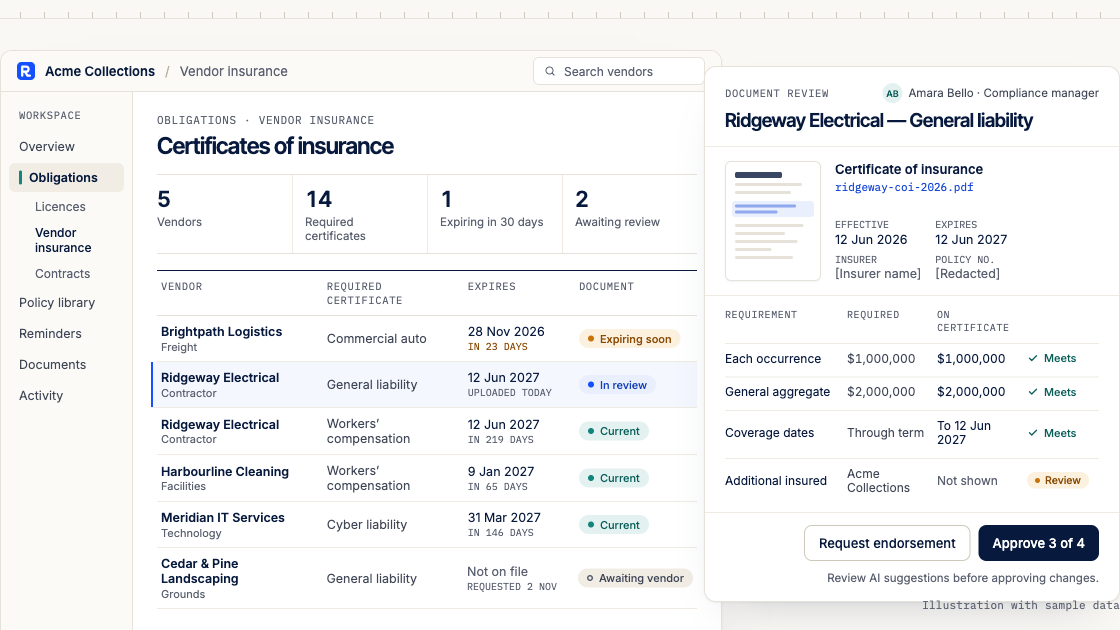
With Vendor & Insurance Compliance, organizations can maintain vendor contacts and keep required documents on file with their expiration dates.
Vendor contacts can be categorized by service type and assigned a risk tier determined by the organization.
This provides context for identifying which suppliers require particular documentation.
Identify missing and expiring documents
Remindash supports compliance policies that define required documents for relevant contacts.
For example, an organization can establish a requirement for vendors to maintain an insurance certificate.
The system can then identify records with missing, expiring or expired documents.
These checks help teams identify documentation gaps. They should not be interpreted as independent confirmation that the underlying insurance policy satisfies every legal or contractual requirement.
Schedule renewal reminders
With Reminders & Sequences, businesses can configure advance notifications for upcoming deadlines.
Reminders can be sent to responsible employees and selected contacts through supported channels, including email, SMS and WhatsApp.
Channel availability and escalation features depend on the organization's subscription plan.
Connect vendor requirements to obligations
Some vendor agreements require insurance to be maintained throughout the contractual relationship.
Remindash's Obligation Management capability allows organizations to track responsibilities with owners, due dates, source information and activity history.
For example, a business could create an obligation to review a contractor's insurance documentation before its recorded policy expiration date.
Identify requirements in vendor agreements
Remindash's Document Intelligence can suggest potential obligations and important dates from uploaded agreements and other documents.
These suggestions require human review before being confirmed.
Document analysis availability depends on workspace enablement.
Maintain an operational record
Remindash records activity associated with obligations and reminders, helping teams understand what was assigned, what changed and which actions were completed.
This supports accountability when several departments are involved in managing vendor documentation.
Remindash is not an insurance broker, insurer or coverage-verification service. It helps organizations manage documents, requirements and follow-up activities. Businesses remain responsible for confirming that insurance arrangements satisfy their contractual and legal requirements.
Vendor Certificate of Insurance Tracking Checklist
Use the following checklist to review your organization's COI tracking process.
Vendor and requirement identification
Have we identified every vendor required to provide insurance documentation?
Do we know which insurance requirements apply to each vendor?
Are those requirements connected to the relevant contracts or other sources?
Does every vendor have an accountable internal owner?
Certificate collection and review
Have we received the required certificates?
Does each certificate identify the correct insured entity?
Are the relevant policy numbers and coverage dates recorded?
Have we checked the stated limits against the applicable requirements?
Have we obtained supporting endorsements where necessary?
Are unresolved questions referred to an appropriate insurance professional?
Renewal management
Are expiration dates tracked separately for each relevant policy?
Have advance reminders been configured?
Can we identify missing, expiring and expired documents?
Do we review renewed certificates before accepting them?
Are unresolved issues escalated to the responsible team?
Recordkeeping and oversight
Can we distinguish received documents from reviewed documents?
Is the latest supporting evidence accessible?
Do we record who completed each review?
Can management identify outstanding documentation requirements?
Do we reassess requirements when vendor contracts or activities change?
Frequently Asked Questions About COI Tracking
What does COI tracking mean?
COI tracking is the process of managing certificates of insurance, monitoring their associated policy dates and ensuring that required vendor documentation is collected and reviewed.
Is a certificate of insurance proof that a vendor is insured?
A COI provides information about reported insurance coverage.
However, it is not the insurance policy and does not guarantee that coverage remains in force or applies to every activity.
For important coverage questions, obtain confirmation from an appropriate authorized source.
How often should vendor COIs be updated?
The appropriate schedule depends on the relevant policy periods, contractual requirements and activities.
Organizations commonly request updated certificates when policies renew or when the vendor's insurance arrangements change.
There is no universal annual renewal rule that applies to every COI.
What happens when a vendor's COI expires?
An expired certificate means the organization no longer has current evidence for the listed policy period.
It does not necessarily mean the vendor is uninsured.
Request updated documentation and determine whether the underlying coverage remains in force.
If insurance is required for the vendor's activities, review whether work should continue while the issue is unresolved.
Does being a certificate holder make my company an additional insured?
No.
Certificate holder status and additional insured status are different.
Additional insured protection depends on the underlying policy and applicable endorsements or provisions.
Can I use Excel to track certificates of insurance?
Yes.
A spreadsheet can track vendor names, policy numbers, expiration dates and responsible employees.
However, organizations with many vendors may benefit from dedicated software for document checks, reminders and follow-up.
Can COI tracking software verify insurance coverage automatically?
Not necessarily.
Some products may offer integrations or verification services, while others focus on document collection and expiration tracking.
Confirm the capabilities of the specific platform before relying on it for coverage verification.
Final Thoughts: Make Vendor Insurance Requirements Easier to Manage
Vendor certificate of insurance tracking should be more than collecting documents once and storing them in a folder.
A reliable process helps businesses understand which vendors require insurance documentation, what coverage information needs to be reviewed and when updated evidence should be requested.
Start by identifying the relevant vendors and their requirements.
Then create a central register, assign responsibility, review submitted documents and configure advance reminders.
Most importantly, distinguish between having a certificate on file and confirming that the underlying insurance arrangements satisfy the organization's needs.
When every vendor requirement has an owner, every expiration date is visible and every missing document has a follow-up action, insurance documentation becomes much easier to manage.
Keep Vendor Insurance Requirements Organized With Remindash
Stop relying on scattered emails and spreadsheets to manage vendor insurance certificates.
With Remindash, you can organize vendor documents, identify missing and expiring certificates, assign responsibilities and configure reminders before important deadlines.
Explore Remindash Vendor & Insurance Compliance and bring your vendor documentation requirements into one place.
Get hands-on compliance support
Work with Remindash to turn requirements into an operational plan.
This article is general guidance, not legal advice. Which requirements apply depends on your circumstances; review official sources and obtain professional advice where appropriate.