How to Build a Compliance Deadline Calendar That Actually Works
A compliance deadline calendar helps businesses stay ahead of regulatory filings, licence renewals, policy reviews and other recurring responsibilities. Learn how to build a practical calendar with verified deadlines, clear ownership and reliable reminders.
 17 min read
A regulatory filing is due next Friday. A business licence expires at the end of the month. An employee's professional certification needs renewal, and a contract requires written notice before its renewal date.
Each responsibility has a deadline. Each may involve a different department, government authority or approval process.
The problem is that these dates rarely live in one place.
Some are buried in contracts. Others appear in regulatory guidance, spreadsheets, emails or individual calendars.
When a business relies on people remembering what needs to happen, even important deadlines can be overlooked.
A compliance deadline calendar brings these responsibilities together.
It helps organizations understand what is due, when preparation should begin, who is responsible and whether the required work has been completed.
But a useful compliance calendar needs to do more than display dates.
It should connect every deadline to a verified requirement, provide enough time for preparation and make outstanding work visible before it becomes urgent.
This guide explains how to build a compliance deadline calendar that supports everyday operations, with practical examples, a sample calendar structure and a repeatable reminder workflow.
What Is a Compliance Deadline Calendar?
A compliance deadline calendar is a structured schedule of regulatory, contractual and organizational responsibilities that must be completed by particular dates or within defined periods.
It helps businesses monitor activities such as regulatory filings, business licence renewals, insurance renewals, employee certification expirations, policy reviews, inspections and contractual notice requirements.
Unlike a regular calendar, a compliance calendar should provide context for each deadline.
For example, a calendar entry labelled “Annual Regulatory Filing — March 31” is not particularly useful on its own.
The person responsible still needs to know which filing is required, which legal entity must submit it, why the requirement applies, what documents are needed and how completion will be confirmed.
A well-designed compliance calendar connects those details to the deadline.
This makes it easier for teams to prepare, coordinate and maintain accountability.
Compliance calendar vs compliance obligations register
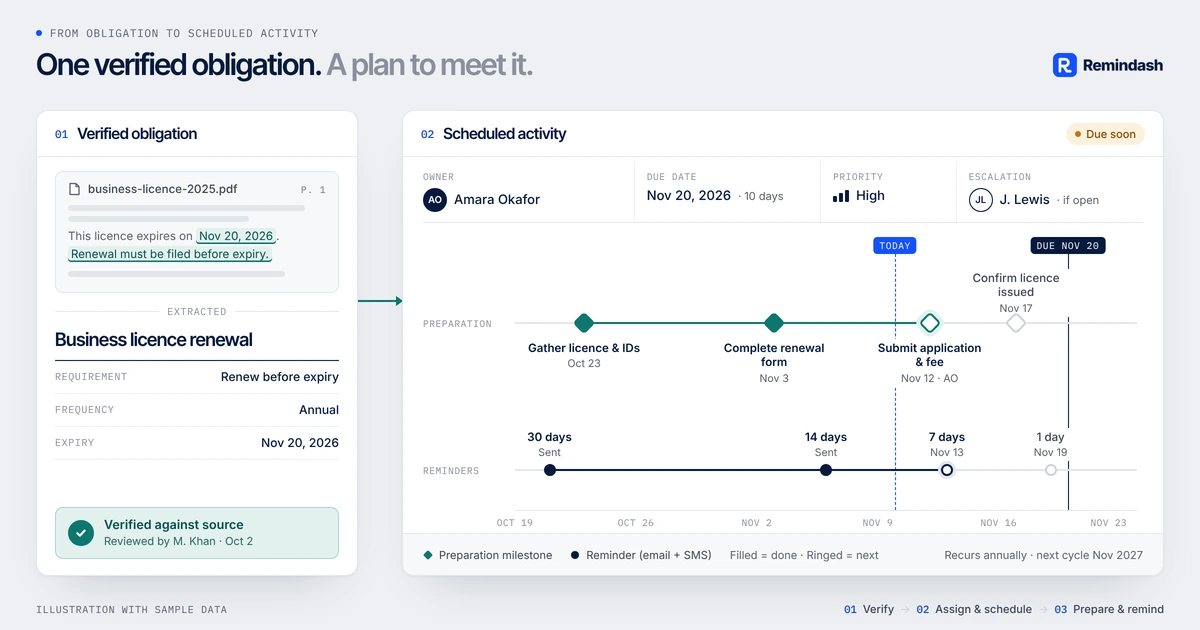
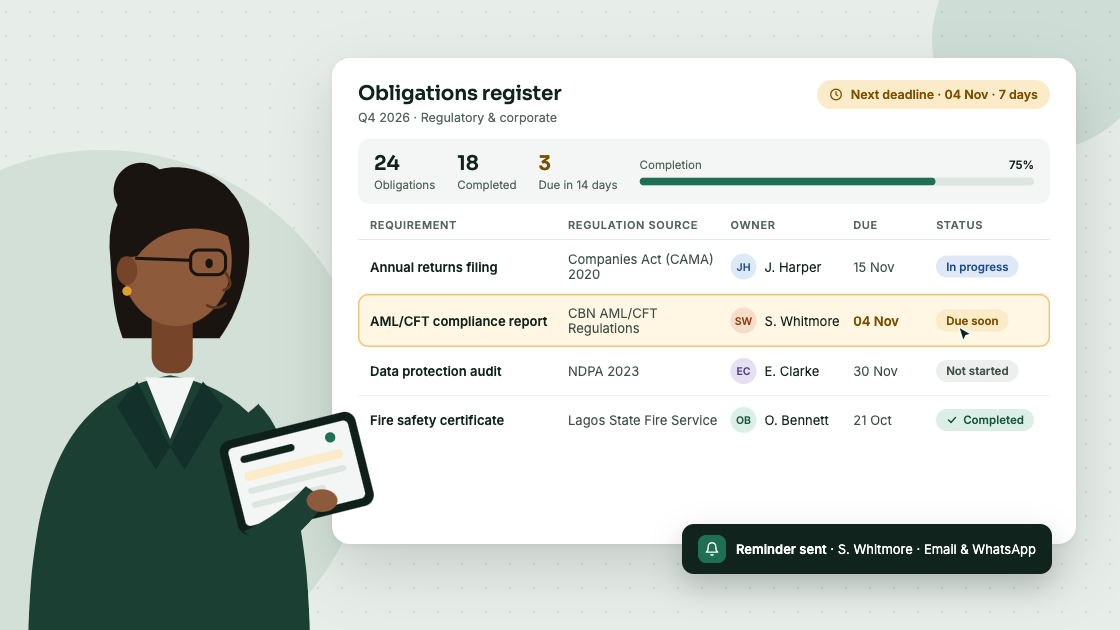
A compliance obligations register and a compliance calendar serve related but different purposes.
The register identifies and documents the organization's responsibilities.
It records the requirement, source, applicability, owner and other relevant information.
The calendar focuses on when action is required.
It translates applicable obligations into scheduled work, preparation milestones and reminders.
For example:
Obligation register: File the company's annual confirmation statement with UK Companies House.
Compliance calendar: Review company information, prepare the confirmation statement and complete the filing before the company's verified deadline.
The register explains the responsibility. The calendar helps the team act on it.
For a detailed explanation of how to identify and document requirements, read our guide to building a compliance obligations register.
Why Businesses Need a Compliance Deadline Calendar
Compliance responsibilities often become more complicated as organizations grow.
A small business may have a few annual filings and renewals.
A larger company may operate across multiple locations, employ regulated professionals, work with numerous vendors and maintain contracts with different notice periods.
Without a central calendar, several problems can emerge.
Deadlines become scattered across departments
Finance may track corporate filings, HR may monitor employee certifications, Legal may manage contractual notices, and Operations may oversee licences and inspections.
Each department may maintain its own spreadsheet or calendar.
The result is limited visibility into the organization's overall workload.
Preparation begins too late
Many compliance activities require work before the actual deadline.
A regulatory filing may require financial information, management approval or supporting documents.
A licence renewal may involve an inspection.
A contract may require a decision about whether to renew or terminate.
If the calendar records only the final due date, the team may discover the requirement too late to complete the necessary preparation.
Ownership becomes unclear
A calendar entry does not guarantee that someone is responsible for completing it.
Without an accountable owner, reminders may be ignored or forwarded between departments.
Recurring obligations are forgotten
Some responsibilities repeat annually, quarterly or according to another schedule.
If the next occurrence is not created after completion, the obligation may disappear from view.
Completed work is difficult to verify
A calendar entry marked complete should correspond to an actual outcome.
For example, submitting a renewal application is not necessarily the same as receiving approval.
A reliable compliance process should distinguish between preparation, submission, approval and verified completion.
What Should a Compliance Deadline Calendar Include?
A practical calendar should contain enough information to explain each deadline and support the work required.
Field | Purpose |
|---|---|
Obligation ID | Unique reference connecting the calendar to the obligation |
Obligation title | Clear description of the required activity |
Source | Regulation, contract, licence, policy or other document |
Jurisdiction | Country, state or region concerned |
Applicable entity | Company, subsidiary or location responsible |
Legal deadline | Official date or deadline calculation |
Internal target date | Earlier date established for preparation or completion |
Responsible owner | Person accountable for the activity |
Supporting team | Other people involved |
Recurrence | Whether and how the obligation repeats |
Priority | Relative importance or urgency |
Status | Open, preparing, submitted, completed or overdue |
Evidence | Confirmation or supporting records |
Last verified | When the requirement and deadline were last checked |
One of the most important distinctions is between the legal deadline and the internal target date.
A business may need to file a report by December 31 but establish December 15 as its internal completion target.
The internal date gives the team time to resolve unexpected issues.
However, it must not replace or obscure the actual legal deadline.
Both dates should remain visible.
How to Build a Compliance Deadline Calendar in 7 Steps
A reliable calendar begins with verified obligations, not a collection of dates copied from the internet.
The following process can work for a small business, a multi-location organization or a compliance team managing responsibilities across several jurisdictions.
Step 1: Identify your organization's compliance obligations
Start by gathering the requirements that apply to your business.
These may come from legislation, regulations, contracts, operating licences, employment requirements, insurance policies and internal procedures.
Review the relevant source documents and identify requirements that involve a deadline, reporting period, renewal date or recurring activity.
For example, a business might need to track annual corporate filings, employee certification renewals, contract termination notices and periodic safety inspections.
Not every requirement found during research will apply to your organization.
Before adding an item to the calendar, establish its applicability and record the source supporting that decision.
If you already maintain a compliance obligations register, use it as the starting point.
Step 2: Classify deadlines by type
One of the most common compliance calendar mistakes is treating every obligation as an annual event.
In practice, deadlines follow different patterns.
Deadline type | Description | Example |
|---|---|---|
Fixed date | A specific date established by the applicable requirement | December 31, 2026 |
Annual anniversary | Calculated from a company-specific date | Corporate anniversary filing |
Recurring interval | Repeats according to a defined schedule | Quarterly contractual report |
Expiration-based | Connected to a licence, certificate or policy | Insurance policy renewal |
Event-triggered | Begins when a particular event occurs | Notifiable personal data breach |
Continuous | Applies throughout an activity or period | Maintaining required safeguards |
This classification determines how the requirement should be managed.
A fixed deadline can be added to a calendar immediately.
An anniversary-based requirement needs the relevant company's anniversary date.
An event-triggered obligation needs a response procedure rather than a predetermined annual calendar entry.
Continuous obligations may require periodic monitoring, but an internal review date should not be confused with a statutory deadline.
Step 3: Verify the actual deadline
Never assume that a regulatory deadline is the same for every organization.
Consider the UK confirmation statement.
According to Companies House guidance, companies must review their information and file at least one confirmation statement every 12 months. Filing is permitted up to 14 days after the review period ends.
The review period is determined by the company's incorporation date or its previous confirmation statement date. Filing early can also change the next review period. GOV.UK
Therefore, a compliance calendar should record the actual deadline for the company concerned.
The same principle applies to Canadian federal corporations.
Corporations Canada states that active corporations governed by the Canada Business Corporations Act must file their annual return within 60 days following their corporate anniversary date. This is separate from their income tax return. ISED Canada
A company should verify its anniversary date rather than assign an arbitrary annual filing deadline.
Practical rule: Every regulatory calendar entry should have a source reference and a recorded verification date.
Step 4: Create preparation milestones
A deadline tells you when something must be completed.
It does not tell you when work should begin.
For important obligations, create internal milestones before the legal deadline.
Consider an illustrative regulatory filing due December 31.
Date | Internal milestone |
|---|---|
November 16 | Begin preparing supporting information |
December 1 | Confirm document completeness |
December 8 | Complete initial review |
December 15 | Obtain required internal approvals |
December 22 | Target submission and verification |
December 31 | Legal deadline |
These are suggested internal milestones, not statutory requirements.
The preparation period should reflect the complexity of the work and the relevant authority's instructions.
Some filings may require only a short preparation period. Others may need several months.
For example, an obligation involving an external audit, board approval or inspection may require more preparation time than a straightforward online return.
Step 5: Assign an accountable owner
Every calendar entry should identify one person accountable for coordinating its completion.
Other employees may contribute, but accountability should remain clear.
For example:
Activity | Accountable owner | Supporting team |
|---|---|---|
Corporate annual return | Company Secretary | Legal, Finance |
Employee certification renewal | HR Manager | Department Manager |
Business licence renewal | Operations Manager | Finance, Legal |
Insurance renewal | Finance Manager | Broker, Operations |
Contract notice deadline | Legal Manager | Procurement |
An owner should know what is required, when preparation must begin, who needs to contribute and how completion will be verified.
If the owner changes roles or leaves the organization, responsibility should be reassigned without losing the obligation's history.
Step 6: Configure reminders and escalation
Once the calendar is established, configure reminders that support the preparation process.
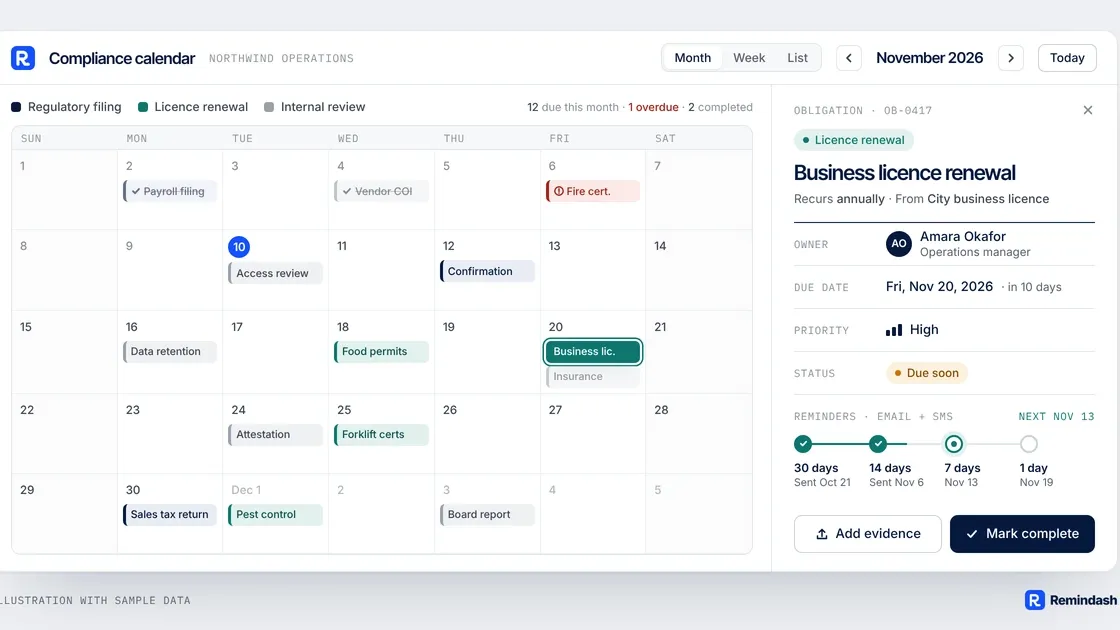
A typical internal reminder sequence might look like this:
Timing | Notification |
|---|---|
60 days before | Notify the responsible owner |
30 days before | Request progress confirmation |
14 days before | Notify the owner and supporting team |
7 days before | Escalate unresolved preparation |
On the deadline | Request completion confirmation |
After the deadline | Escalate overdue work |
These intervals are recommendations, not universal legal requirements.
A high-priority filing might need reminders beginning several months earlier.
A routine internal policy review might require fewer notifications.
The purpose is to ensure that the right people receive information early enough to act.
Avoid sending repeated reminders without a defined next action. A useful reminder should tell the recipient what is due, why it matters and what needs to happen.
Step 7: Verify completion and update the calendar
A compliance calendar should not treat every submitted activity as automatically completed.
Consider a business licence renewal.
Submitting an application may be only one stage of the process. The licensing authority may still need to review or approve it.
Similarly, an internal policy review may require management approval before the updated policy becomes effective.
Your process should distinguish between preparation, submission, pending approval and verified completion.
Once the activity is completed, record the relevant confirmation and update the next occurrence where appropriate.
For recurring obligations, verify whether the next deadline follows the same schedule.
Do not automatically copy last year's deadline if the governing rules or relevant circumstances have changed.
Compliance Deadline Calendar Examples for 2026 and 2027
The following examples illustrate why a compliance calendar must support different deadline structures.
They are based on official regulatory guidance reviewed in November 2026.
Jurisdiction | Requirement | Verified timing | Applicability |
|---|---|---|---|
Ontario, Canada | AODA accessibility compliance report | December 31, 2026 | Covered businesses and nonprofits with 20 or more employees |
United States | OSHA Form 300A workplace posting | February 1–April 30, 2027 | Employers subject to the relevant OSHA recordkeeping requirements |
United Kingdom | Companies House confirmation statement | Within 14 days after the review period ends | Companies required to file confirmation statements |
Canada | Federal corporation annual return | Within 60 days after the corporate anniversary date | Active corporations governed by the CBCA |
United Kingdom | Notifiable personal data breach | Without undue delay and, where feasible, within 72 hours of awareness | Controllers experiencing a breach that meets the notification threshold |
These are different kinds of requirements and should not be managed identically.
Ontario AODA reporting: a fixed deadline
Ontario's accessibility compliance reporting guidance confirms that businesses and nonprofit organizations with 20 or more employees must file accessibility compliance reports every three years.
The current reporting deadline is December 31, 2026.
Designated public-sector organizations follow a different reporting cycle; their previous deadline was December 31, 2025. Government of Ontario
A covered business could add the December 31 deadline to its calendar and establish earlier internal milestones for reviewing accessibility requirements and preparing the report.
The applicable reporting category and filing instructions should be verified using Ontario's official accessibility compliance reporting guidance.
OSHA Form 300A: a recurring posting period
Under OSHA's recordkeeping rules, covered employers must prepare and certify the annual Form 300A summary and post it in the workplace from February 1 through April 30 of the following year.
Therefore, for the 2026 reporting year, the relevant workplace posting period is February 1–April 30, 2027.
Employers with 10 or fewer employees and certain low-risk industries are generally exempt from routine recordkeeping requirements, although exceptions and other reporting obligations may apply. OSHA
A compliance calendar should distinguish the preparation and certification work from the posting period.
Certain employers also have separate electronic submission obligations, which should be tracked independently where applicable.
See OSHA's official recordkeeping guidance for the applicable requirements.
UK confirmation statements: a company-specific deadline
The UK confirmation statement is an example of a recurring obligation whose deadline depends on the company's own records.
A calendar should contain the actual review period end date and the resulting filing deadline.
It should also be updated if the company files early and its next review period changes.
Canadian annual returns: an anniversary-based deadline
For active corporations governed by the Canada Business Corporations Act, the annual return deadline is linked to the corporation's anniversary date.
This means two corporations incorporated on different dates may have different filing deadlines.
The calendar should record the relevant anniversary date and calculate the applicable filing window.
UK GDPR breach reporting: an event-triggered deadline
Not every compliance deadline can be scheduled in advance.
Under the UK GDPR, a controller must report a notifiable personal data breach to the Information Commissioner's Office without undue delay and, where feasible, within 72 hours of becoming aware of it.
Not every personal data breach requires notification to the regulator; the reporting threshold depends on the risk to individuals' rights and freedoms. Information Commissioner's Office
A business cannot know in advance when such an incident will occur.
Instead, it should maintain an incident response process that identifies when the reporting clock begins, assigns responsibility and monitors the response deadline.
See the ICO's personal data breach guidance.
The lesson: A compliance calendar must accommodate fixed dates, calculated dates, recurring periods and event-triggered responsibilities without confusing them.
Compliance Calendar Template: A Practical Example
A simple compliance calendar might look like this:
Obligation | Legal deadline | Internal target | Owner | Status |
|---|---|---|---|---|
Ontario AODA report, if applicable | Dec 31, 2026 | Dec 15, 2026 | Compliance | Preparing |
UK confirmation statement | Company-specific | Before verified deadline | Legal | To verify |
OSHA Form 300A posting, if applicable | Feb 1–Apr 30, 2027 | Jan 25, 2027 | HR/Safety | Planned |
Vendor insurance renewal | Policy-specific | Before expiry | Procurement | In progress |
Annual employee certification review | Internal policy date | Before review date | HR | Planned |
This is an illustrative calendar. The legal applicability, actual deadlines and status of each obligation must be confirmed for the organization concerned.
The template separates statutory deadlines from internal targets.
It also allows the organization to identify which dates still require verification.
How to use this template
Begin with a verified obligations register.
Add each applicable obligation to the calendar and identify its deadline type.
For fixed-date obligations, record the actual date.
For recurring obligations, establish the appropriate recurrence rule.
For event-triggered obligations, create an operational response procedure.
Finally, assign an owner and establish preparation milestones.
A calendar should not be considered complete merely because every row contains a date.
It is complete when every applicable requirement has a verified schedule, responsible owner and clear completion process.
Should You Use Excel or Compliance Calendar Software?
Excel can be a reasonable starting point for businesses with relatively few compliance responsibilities.
It allows teams to organize deadlines, assign owners and filter upcoming activities.
However, spreadsheets become harder to maintain when obligations involve multiple departments, jurisdictions and recurring schedules.
Capability | Excel spreadsheet | Dedicated compliance software |
|---|---|---|
Record deadlines | Yes | Yes |
Assign owners | Manual | Usually supported |
Recurring schedules | Formulas or manual updates | May be automated |
Advance reminders | Requires additional tools | Often supported |
Escalation | Manual or custom automation | May be supported |
Source references | Links or attachments | Depends on platform |
Activity history | Requires version management | Often supported |
Completion evidence | Manually organized | Depends on platform |
Cross-team visibility | Shared spreadsheet | Usually supported |
A spreadsheet may work well when one person manages a small number of deadlines.
Dedicated software becomes more useful when responsibilities are distributed across teams or require repeatable reminders, escalations and completion records.
The important question is not whether your calendar looks organized.
It is whether the organization can reliably determine what is due, who owns it and whether the required work has been completed.
How Remindash Helps You Manage Compliance Deadlines
A compliance calendar is most effective when its deadlines are connected to the underlying responsibilities.
Remindash helps businesses turn regulatory requirements, contracts, licences, policies and recurring activities into trackable obligations.
Rather than maintaining disconnected spreadsheets and reminders, teams can organize responsibilities around their sources, owners, deadlines and activity histories.
Keep obligations and deadlines connected
With Remindash Obligation Management, organizations can record responsibilities with assigned owners, due dates, priorities and recurrence schedules.
Each obligation can retain a reference to the source document or requirement.
This makes it easier to understand why a deadline exists.
Identify dates in documents
Contracts, policies and certificates often contain important dates that are easy to overlook.
Remindash's Document Intelligence capability can suggest obligations and dates from uploaded documents.
These suggestions require human review and confirmation before becoming tracked obligations.
Document analysis availability depends on workspace enablement.
Configure advance reminders
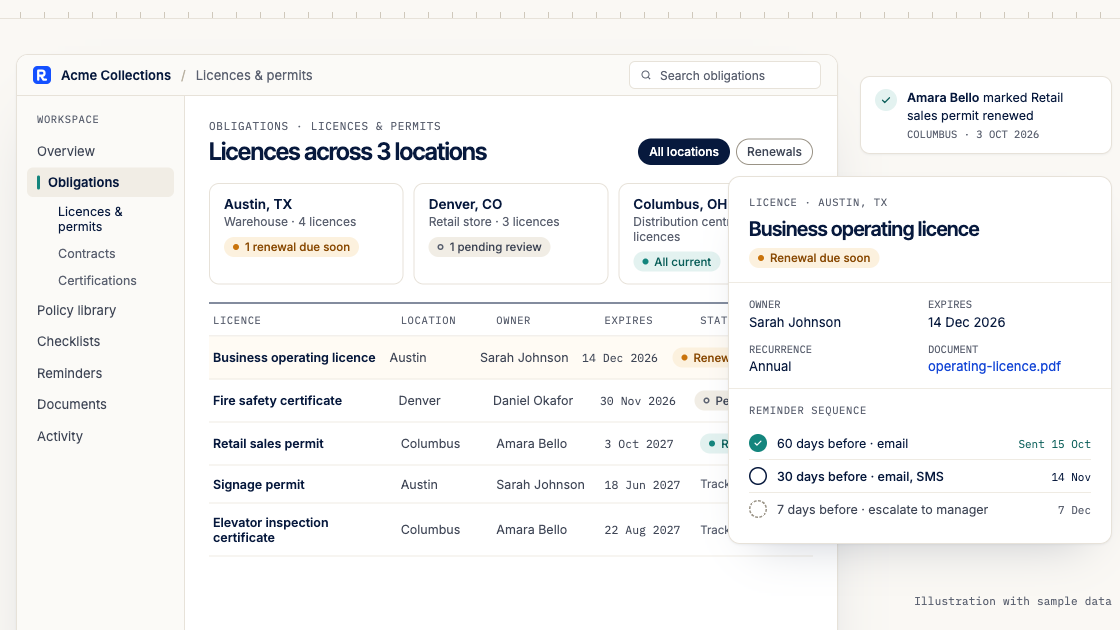
With Reminders & Sequences, teams can create notification schedules before deadlines.
Reminders can be directed to responsible employees and groups using supported email, SMS and WhatsApp channels.
The available channels and escalation capabilities depend on the organization's subscription plan.
Track recurring responsibilities
Remindash supports recurring obligations.
For example, a business can configure an annual policy review or a recurring filing requirement after verifying the applicable schedule.
Each occurrence can be monitored with its own due date and status.
Maintain an activity history
Remindash records activity associated with obligations, including ownership changes and completion actions.
This provides operational visibility when teams need to understand what happened and who was responsible.
Get help managing your obligations
Organizations that need additional operational support can use Remindash Managed.
The service helps businesses organize documents, identify obligations, configure reminders and escalations, and monitor deadlines.
The organization's own team remains responsible for legal applicability decisions, compliance approvals and fulfilling its requirements.
Remindash helps businesses organize and monitor obligations. It does not guarantee regulatory compliance, provide legal advice or submit government filings automatically.
Common Compliance Calendar Mistakes to Avoid
1. Copying deadlines without verifying applicability
A regulatory deadline may apply only to certain industries, company sizes or activities.
Always confirm that the requirement applies before adding it to the organization's calendar.
2. Recording only the final deadline
A filing that requires several weeks of preparation needs internal milestones.
Otherwise, the team may receive its first reminder too late.
3. Confusing internal targets with legal deadlines
An internal target may be earlier than the legal deadline.
Both should remain visible and clearly identified.
4. Assuming all obligations repeat annually
Some requirements follow company-specific anniversaries, different intervals or event-triggered schedules.
Use the correct recurrence rule for each obligation.
5. Failing to assign an owner
A calendar entry without an accountable owner can remain unresolved even when several people receive reminders.
6. Marking submitted work as completed
Submission does not always mean acceptance or approval.
Define what constitutes completion for each obligation.
7. Failing to update the calendar
Changes in regulations, business activities, corporate information or contractual arrangements can affect deadlines.
Establish a process for reviewing and updating the calendar.
Frequently Asked Questions About Compliance Deadline Calendars
What is a compliance deadline calendar?
A compliance deadline calendar is a structured schedule of regulatory, contractual and organizational responsibilities with specific deadlines or recurring requirements.
It helps teams monitor upcoming work, assign accountability and prepare before deadlines.
What should a compliance calendar include?
At minimum, it should identify the obligation, source, applicable entity, deadline, responsible owner, recurrence and current status.
Important obligations should also include preparation milestones and completion evidence.
Is a compliance calendar legally required?
Not every organization is legally required to maintain a document specifically called a compliance calendar.
However, many laws and regulations establish deadlines, reporting periods and recordkeeping requirements.
A compliance calendar can help businesses manage those responsibilities.
How often should a compliance calendar be reviewed?
The appropriate frequency depends on the organization's activities and regulatory environment.
A weekly operational review may be useful for identifying upcoming deadlines, while a more comprehensive review can address changes in requirements and applicability.
Urgent or event-triggered obligations require attention outside ordinary review cycles.
Can I build a compliance calendar in Excel?
Yes.
Excel can work for organizations with a manageable number of deadlines.
As obligations increase, dedicated software may help with recurring schedules, reminders, accountability and activity tracking.
What is the difference between a compliance calendar and a compliance register?
A compliance register documents the requirements that apply to an organization.
A compliance calendar focuses on when action must be taken to fulfill those requirements.
The two work best when connected.
How do I prevent missed compliance deadlines?
Start by verifying applicable requirements.
Then assign accountable owners, establish preparation milestones, configure advance reminders and monitor completion.
Regularly review the calendar and update it when requirements change.
Can compliance calendar software automatically make my business compliant?
No.
Software can help organize obligations, monitor deadlines and support accountability.
The organization remains responsible for determining which requirements apply and completing the necessary activities.
Final Thoughts: A Compliance Calendar Should Drive Action
A compliance deadline calendar should do more than display important dates.
It should help your organization understand what needs to happen, who is responsible and whether the required work has been completed.
The process begins with identifying applicable obligations and verifying their deadlines.
From there, establish preparation milestones, assign ownership, configure reminders and maintain reliable completion records.
Whether you begin with a spreadsheet or dedicated software, the objective remains the same:
Make every important deadline visible, give every responsibility an owner and create enough time for the work to be completed properly.
Bring Your Compliance Deadlines Into One Place With Remindash
Stop relying on scattered spreadsheets, emails and personal calendars to manage important business responsibilities.
With Remindash, you can organize obligations, assign owners, configure reminders and maintain an activity history.
Get started with Remindash and build a more organized approach to managing compliance deadlines.
Get hands-on compliance support
Work with Remindash to turn requirements into an operational plan.
This article is general guidance, not legal advice. Which requirements apply depends on your circumstances; review official sources and obtain professional advice where appropriate.