How to Track Business License Renewals Across Multiple Locations
Managing business licenses across multiple locations can quickly become complicated. Learn how to organize permits, track renewal dates, assign responsibilities, and keep every location's licensing requirements visible.
 16 min read
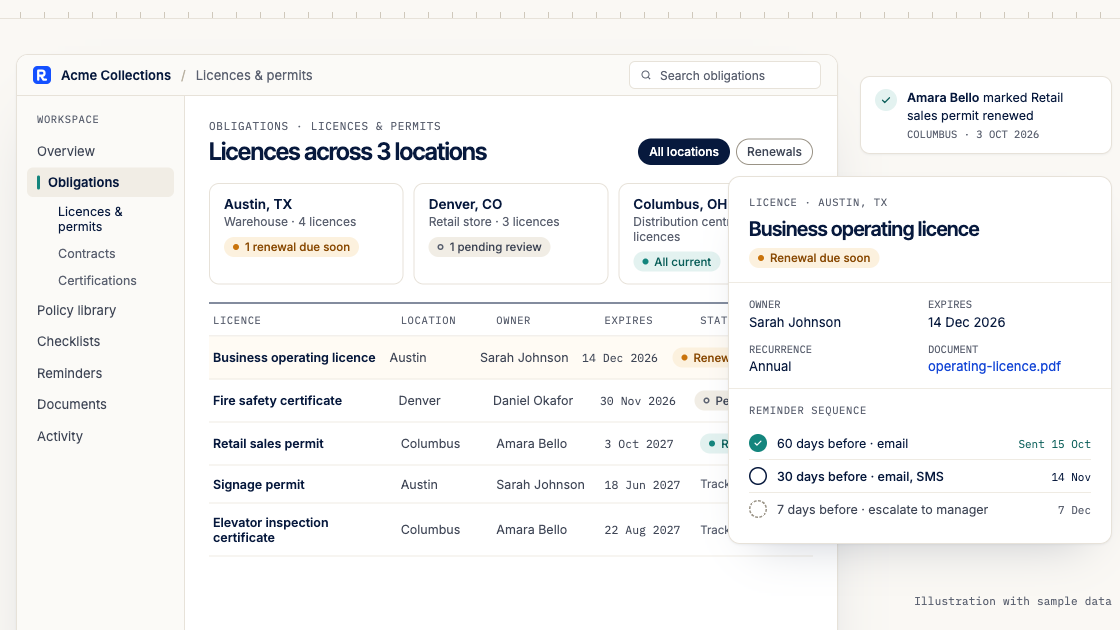
Managing business licenses becomes more complicated when your company operates from several locations.
A business with one office might have only a handful of licenses and permits to monitor. But as it expands into new cities, counties or states, the number of requirements can increase significantly.
Each location may have different licensing authorities, renewal dates, documentation requirements and responsible employees.
A restaurant group might need to track local business licenses, health permits and other operating approvals. A construction company may need different contractor licenses depending on where it operates. A retail chain might have separate licensing requirements for each store.
When these records are spread across spreadsheets, emails, shared folders and individual calendars, it becomes difficult to answer a simple question:
Are all our business locations operating with the licenses and permits they require?
Business license renewal tracking provides a structured way to answer that question.
In this guide, we'll explain how to organize business licenses across multiple locations, track renewal deadlines, assign responsibilities and establish a process that helps prevent important renewals from being overlooked.
What Is Business License Renewal Tracking?
Business license renewal tracking is the process of identifying, recording, monitoring and managing the licenses and permits a business needs to maintain its operations.
It involves more than recording expiration dates.
An effective tracking process helps a business understand which licenses apply to each location, which government authorities issue them, when renewals are due, what supporting information is required and who is responsible for completing each renewal.
For example, a company operating five retail stores might need to maintain a central record showing each store's licenses, issuing authorities, expiration dates and renewal statuses.
This allows the company to monitor licensing requirements across its entire operation instead of relying on each store manager to maintain separate records.
The goal is to make every renewal visible, assign accountability and retain a reliable record of what has been completed.
Why Business License Tracking Gets Complicated Across Multiple Locations
A company operating in several jurisdictions cannot assume that all its locations follow the same licensing rules.
In the United States, business licensing requirements may arise at federal, state, county or municipal levels.
According to the U.S. Small Business Administration's licensing guidance, the permits a business needs depend on its activities and location. Businesses may also need approvals from more than one level of government.
This creates several challenges.
Different locations may require different licenses
A company may operate the same type of business in two cities but face different local licensing requirements.
For example, California's Office of the Small Business Advocate explains that businesses operating within an incorporated city generally obtain their local business license from the city, while businesses in unincorporated areas typically deal with the county. Additional state or local permits may apply depending on the activity. CalOSBA
This means a business should not assume that a license obtained for one location automatically covers another.
Renewal dates may not follow the same schedule
Some licenses renew annually. Others have different validity periods, expiration dates or renewal conditions.
Even when two licenses renew annually, they may not share the same deadline.
For example, Seattle business license tax certificates expire on December 31, while Washington State business license endorsements can have expiration dates determined by the particular license record. Seattle.gov
A business operating in both jurisdictions must therefore verify the applicable dates rather than apply one standard renewal schedule to every record.
Different departments may be responsible
Business licensing often involves several teams.
Operations may manage location-specific permits, Finance may handle renewal payments, Legal may review regulatory requirements, and individual location managers may provide supporting documents.
Without clear ownership, an important renewal can remain unfinished because each team assumes someone else is handling it.
Renewal requirements can change
A business may need to update information, submit supporting documents, complete an inspection or meet additional conditions before a license can be renewed.
A renewal that was straightforward last year may require additional work this year.
This makes it important to review current instructions from the issuing authority before beginning each renewal.
Expansion creates additional responsibilities
Opening another branch, relocating a business or adding a new regulated activity may create additional licensing requirements.
A central tracking process should therefore cover both existing renewals and new licensing requirements arising from business changes.
What Types of Business Licenses and Permits Should You Track?
Before building a renewal calendar, identify the different types of licenses and permits your business may need.
The exact requirements depend on your industry, activities and operating locations.
License or permit category | Examples | What to monitor |
|---|---|---|
General business licenses | City or municipal business licenses | Issuing authority, location, expiration date |
Industry-specific licenses | Contractor, healthcare or financial services licenses | Regulatory requirements, renewal conditions |
Health and safety permits | Food establishment permits and other health approvals | Permit validity, inspections, renewal requirements |
Professional licenses | Licenses required for regulated individuals or services | License holder, professional authority, expiration |
Location-specific permits | Certain building, occupancy or operating permits | Approved premises, validity, conditions |
Environmental permits | Permits required for regulated activities | Reporting conditions, expiration or renewal requirements |
Other operating approvals | Activity-specific state or local authorizations | Scope, issuing authority, renewal process |
Not every business needs every category.
For example, a professional services company may have fewer premises-related permits than a restaurant group, while a manufacturing business may have additional environmental or safety requirements.
The important step is to identify which requirements actually apply.
Distinguish company licenses from location-specific permits
Some authorizations relate to the legal entity operating the business. Others relate to a particular establishment, activity or individual.
This distinction matters when managing multiple locations.
A license issued to a company should not automatically be treated as authorization for every branch.
Similarly, a permit tied to one premises should not be assumed to cover another location.
When creating your register, record whether each authorization applies to the entire company, a particular location, a regulated activity or an individual.
This makes it easier to identify gaps when the business expands or changes its operations.
How to Build a Business License Renewal Tracking System
A reliable process starts with a complete inventory and ends with verified renewal records.
The following seven steps provide a practical framework.
Step 1: Create a complete list of business locations
Begin by documenting every location where your organization conducts activities that may require licensing.
Include headquarters, branch offices, retail stores, warehouses, restaurants, production facilities and other relevant operating sites.
For each location, record its name, physical address, jurisdiction, operating activities and responsible manager.
You should also identify which legal entity operates the location.
This is particularly important for groups where different subsidiaries or franchisees operate different sites.
A useful location record might look like this:
Field | Example |
|---|---|
Location ID | STORE-004 |
Location name | Downtown Branch |
Operating entity | Example Retail LLC |
Address | 100 Example Street |
City | Seattle |
State | Washington |
Location manager | Sarah Johnson |
Licensing coordinator | Daniel Okafor |
This is an illustrative business record, not an actual licensed establishment.
Once your locations are documented, you can begin identifying their licensing requirements.
Step 2: Identify the licenses required for each location
Research the licensing requirements applicable to each operating site.
Start with official government resources.
The U.S. Small Business Administration provides general guidance on federal, state and local licensing requirements.
For businesses operating in California, the state's CalGOLD permit assistance service helps identify relevant permitting authorities. However, CalGOLD does not issue permits or maintain the current status of individual licenses.
You should therefore confirm actual requirements with the responsible licensing authority. California State Portal
For each location, determine whether the business needs a general business license, an industry-specific authorization, a premises-related permit or another regulatory approval.
Do not rely solely on a previous location's requirements.
A company opening its sixth branch should still verify the requirements for that particular location.
Step 3: Build a central business license register
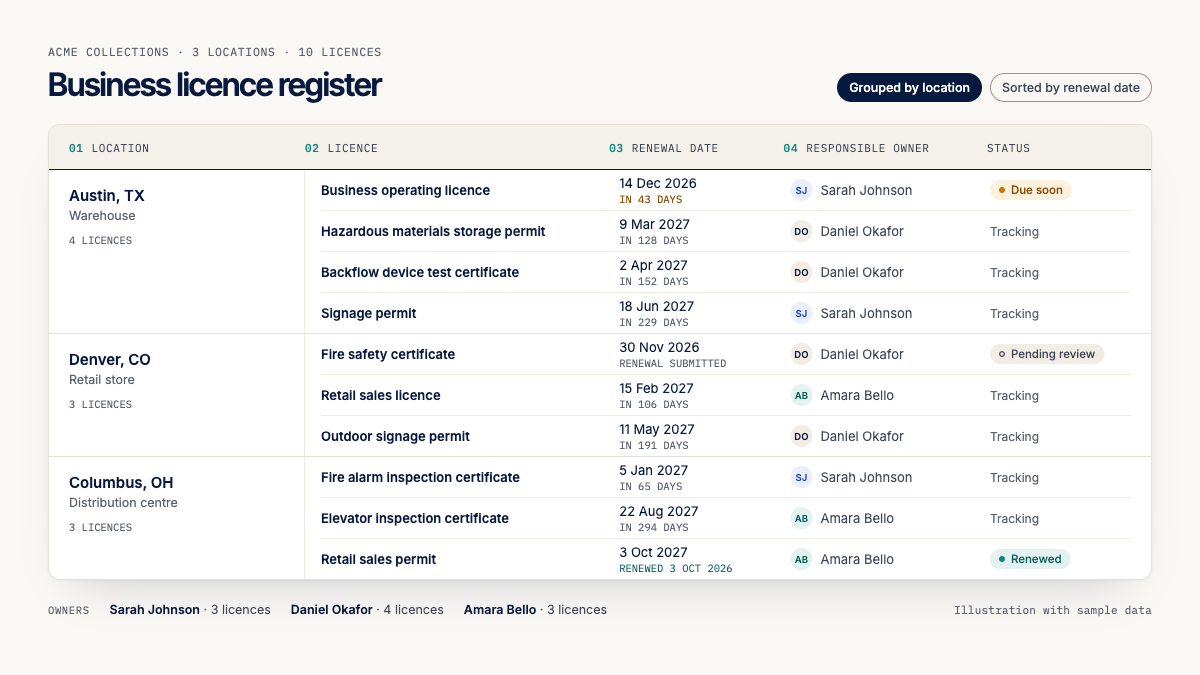
Once you have identified the required licenses, organize them into a single register.
A central register provides visibility across the business while preserving the details of each individual license.
At minimum, record the following information:
Field | Purpose |
|---|---|
License ID | Unique internal reference |
License name | Type of license or permit |
Operating entity | Company that holds the authorization |
Business location | Branch or premises covered |
Issuing authority | Government agency or licensing body |
License number | Official license reference |
Issue date | When the license was issued |
Expiration date | When the authorization expires, if applicable |
Renewal deadline | When renewal action must be completed |
Renewal frequency | Annual, biennial or other applicable cycle |
Responsible owner | Person accountable for renewal |
Renewal status | Current stage of the renewal process |
Supporting documents | License copy, application and other records |
Last verified | Date the information was checked |
Record the renewal deadline separately from the expiration date whenever they differ.
A business may need to submit its renewal application before the existing authorization expires.
The deadline for submitting an application, the expiration date and the date a renewed license becomes effective are not necessarily the same.
Your register should preserve these distinctions.
For a broader explanation of how to structure regulatory responsibilities, read our guide to building a compliance obligations register.
Step 4: Verify expiration dates and renewal requirements
Do not assume that every license renews on the anniversary of its issue date.
Check the license document, issuing authority's instructions and current regulatory requirements.
Some jurisdictions use fixed calendar-year expiration dates.
For example, Seattle states that its business license tax certificates expire on December 31 and must be renewed annually. The city's guidance also explains the applicable payment and late-penalty rules. Seattle.gov
Other licensing systems use dates assigned to individual records.
The Washington Department of Revenue explains that business licenses with city or state endorsements may contain multiple expiration dates. Those dates appear on the license and must be checked individually. Washington Department of Revenue
This illustrates why a single company-wide renewal date is not sufficient for every business.
Your tracking system should use the actual requirements attached to each license.
Step 5: Assign responsibility for every renewal
Every renewal should have one clearly identified accountable owner.
This person is responsible for ensuring that the renewal progresses, even if other employees prepare documents or make payments.
For example, a retail business might use the following arrangement:
Responsibility | Assigned team |
|---|---|
Monitor renewal dates | Compliance |
Gather branch information | Location Manager |
Prepare applications | Operations |
Review regulatory requirements | Legal |
Process renewal payments | Finance |
Confirm renewal completion | Compliance |
The exact arrangement will vary.
Smaller businesses may assign several responsibilities to one person.
Larger organizations may divide the work between central compliance teams and local managers.
What matters is that every renewal has an accountable owner and a clear process for obtaining support from other teams.
Step 6: Set up advance renewal reminders
Waiting until a license is about to expire creates unnecessary pressure.
Some renewals require additional documentation, inspections, approvals or processing time.
A better approach is to establish reminders before the deadline.
For example, an internal renewal workflow might use the following schedule:
Timing | Suggested action |
|---|---|
90 days before | Review current requirements and begin preparation |
60 days before | Gather documents and confirm responsible parties |
30 days before | Submit the renewal application where appropriate |
14 days before | Check application progress and resolve outstanding issues |
7 days before | Escalate unresolved renewals |
On the deadline | Confirm required action has been completed |
After submission | Monitor the application until the authority confirms the outcome |
These intervals are examples, not statutory renewal deadlines.
They should be adjusted to match the issuing authority's requirements and expected processing time.
For instance, the New York City Department of Consumer and Worker Protection states that it sends renewal packages approximately three months before covered licenses expire. Its guidance also makes clear that submitting a renewal application does not automatically mean the license has been renewed. New York City Government
That distinction is essential.
A renewal application marked “submitted” should not automatically change the license status to “renewed.”
Your process should continue tracking the application until the authority confirms the renewal or otherwise determines its status.
Step 7: Record completion and maintain renewal evidence
Once a renewal has been processed, update the license register.
Record the renewal outcome, approval date, new expiration date where applicable, updated license number if changed, and the person who verified the information.
Retain the renewed license and relevant confirmation records according to your organization's retention requirements.
If the authorization has not yet been issued, preserve the distinction between an application that is pending and a renewal that has been approved.
A reliable process should also record unsuccessful applications, rejected renewals and licenses that are no longer required.
This prevents outdated or incomplete information from being mistaken for a valid authorization.
Business License Renewal Tracking Example: Three Locations
Consider a fictional retail company operating three stores.
The company maintains separate license records for each location.
Location | License | Expiration date | Renewal status | Owner |
|---|---|---|---|---|
Seattle Store | City business license tax certificate | Dec 31, 2026 | Preparing renewal | Operations |
Bellevue Store | Applicable local business license | Verify on license | Requirements under review | Compliance |
New York Store | Applicable DCWP license, if required | Verify by license type | Not yet due | Legal |
Illustrative example. Only Seattle's general expiration rule is based on the verified city guidance. Other dates and requirements must be confirmed for the actual business and license type.
At first glance, the company has only three locations.
However, each location may require several authorizations.
If the business maintains four licenses per location, it could have twelve separate records to monitor.
Some may share expiration dates. Others may not.
A central register allows management to identify which licenses are approaching renewal, which applications are pending and which locations require attention.
It also makes it easier to understand whether an unresolved renewal affects one store or several operating sites.
Common Business License Renewal Mistakes to Avoid
Even businesses with established administrative processes can overlook licensing requirements.
The following mistakes are particularly common in multi-location operations.
1. Assuming one license covers every location
A business may obtain a license for its headquarters and incorrectly assume that it covers every branch.
Always verify the scope of each authorization.
2. Using the same renewal date for every license
Different authorities may impose different expiration dates and renewal requirements.
Each license should be tracked according to its actual conditions.
3. Waiting for a government renewal notice
Some licensing authorities send courtesy reminders, but businesses should not depend entirely on receiving them.
Washington's Department of Revenue, for example, explains that a renewal remains due by the expiration date even if the courtesy reminder is not received. Washington Department of Revenue
Maintain your own renewal records and verify them periodically.
4. Confusing submission with approval
Submitting a renewal application does not necessarily mean the license has been renewed.
Keep the application status separate from the authorization's legal validity.
5. Failing to update records after renewal
A completed renewal should result in an updated register.
Otherwise, the organization may continue displaying the old expiration date and generate unnecessary reminders.
6. Leaving responsibility with individual branch managers
Local managers often have valuable information about their operating locations.
However, relying exclusively on their personal calendars or inboxes makes company-wide oversight difficult.
Central visibility and local accountability should work together.
7. Forgetting to review requirements when the business changes
Opening a new branch, moving premises or changing activities can affect licensing requirements.
Make license reviews part of your business expansion and operational change processes.
Business License Tracking Spreadsheet vs Dedicated Software
A spreadsheet can be a practical starting point for a small business.
It allows you to record license details, expiration dates and responsible employees without introducing a new system.
However, manual tracking becomes more difficult as the number of locations and licenses increases.
Capability | Spreadsheet | Dedicated tracking software |
|---|---|---|
Central license register | Yes | Yes |
Location-specific records | Manually structured | Depends on the software |
Renewal reminders | Requires additional setup | Often supported |
Multiple responsible users | Shared editing | Typically supported |
Escalation workflows | Manual or custom automation | May be supported |
Recurring renewals | Formulas or manual updates | May be automated |
Activity history | Requires careful version management | Often built in |
Document references | Links or attachments | Depends on the software |
Renewal status reporting | Manual filters and formulas | Often available |
A spreadsheet may be sufficient when the business has relatively few licenses and one person manages the process.
Dedicated software becomes more useful when renewals involve multiple locations, departments, approval steps or recurring deadlines.
The most important consideration is whether your current process gives the business reliable visibility into every required renewal.
How Remindash Helps Businesses Track License Renewals
Managing licenses across multiple locations requires more than a list of expiration dates.
Businesses need a way to connect each renewal to its source, assign accountability, schedule reminders and maintain a record of what happened.
Remindash helps organizations manage these responsibilities as trackable obligations.
Keep license renewal responsibilities organized
With Remindash Obligation Management, businesses can create obligations for license renewals, assign owners, define due dates and monitor their status.
For multi-location operations, teams can identify the relevant location in each obligation's title or supporting details and maintain a consistent naming convention.
For example:
Seattle Store — Renew Business License — 2026
This helps distinguish renewals belonging to different operating sites.
Connect obligations to their source documents
License documents often contain important information about validity, renewal conditions and the issuing authority.
Remindash supports document-linked obligations, allowing teams to preserve the relationship between a responsibility and its source.
Its Document Intelligence capability can suggest dates and potential obligations from uploaded documents.
These suggestions require human review before they become tracked obligations. Availability of document analysis depends on workspace enablement.
Schedule reminders before licenses expire
With Remindash Reminders and Sequences, teams can configure notifications before renewal deadlines.
Reminders can reach designated recipients through supported email, SMS and WhatsApp channels, depending on the organization's plan and configuration.
For example, a business could configure advance reminders for its operations manager and escalate unresolved work to another responsible person.
Monitor recurring renewals
Many licenses and permits have recurring renewal requirements.
Remindash supports recurring obligations, helping teams manage successive renewal occurrences without manually recreating the same responsibility each year.
However, recurrence should only be configured after the applicable renewal schedule has been verified.
Maintain accountability and activity history
Remindash records changes and activity associated with obligations.
This helps teams understand who was assigned a renewal, when its details changed and whether the obligation was marked complete.
For a closer look at this workflow, explore Remindash License and Permit Management.
Important: Remindash is an obligation and reminder management platform. It does not automatically renew government licenses, submit applications to licensing authorities or independently verify that a business is legally authorized to operate. Businesses must complete the required processes with the relevant authorities and confirm the resulting license status.
Business License Renewal Tracking Checklist
Use this checklist when reviewing your organization's licensing process.
License identification
Have we identified all relevant operating locations?
Have we confirmed the licenses and permits required for each location?
Do we know which legal entity holds each authorization?
Have we recorded the issuing authority and official license number?
Renewal management
Have we verified each license's expiration date?
Do we know when renewal applications must be submitted?
Have we identified supporting documents and approval requirements?
Does every renewal have an accountable owner?
Are reminders scheduled early enough for the required process?
Completion and oversight
Can we distinguish pending applications from approved renewals?
Do we retain appropriate confirmation records?
Are new expiration dates recorded after renewal?
Can management identify overdue or unresolved renewals?
Do we review licensing requirements when locations or activities change?
A useful licensing process should make these questions easy to answer.
Frequently Asked Questions About Business License Renewal Tracking
How do I track business licenses for multiple locations?
Start by creating a complete list of operating locations.
Identify the licenses required for each location, record their issuing authorities and expiration dates, assign responsible owners and establish a renewal calendar.
Maintain separate records where authorizations apply to different premises, activities or legal entities.
Do business licenses need to be renewed every year?
Not necessarily.
Some licenses require annual renewal, while others have different validity periods or renewal conditions.
Always verify the requirements with the issuing authority.
Can one business license cover multiple locations?
It depends on the license and the relevant jurisdiction.
Some authorizations may apply at the company level, while others are specific to an individual location or regulated activity.
Do not assume that one license covers multiple locations without checking its scope.
What happens if a business license expires?
The consequences depend on the jurisdiction, license type and applicable rules.
They may include late fees, restrictions on operations, enforcement action or the need to complete additional licensing procedures.
If a required license has expired, contact the issuing authority promptly and determine whether the affected activity must stop until the authorization is restored.
Is a submitted renewal application enough to continue operating?
Not always.
Some licensing regimes may provide specific continuation provisions, while others require an active authorization.
The applicable rule must be confirmed with the issuing authority. Submitting an application should not automatically be treated as approval.
What is the best way to prevent missed business license renewals?
Maintain a central register, assign an accountable owner to every renewal, verify actual deadlines and configure advance reminders.
For businesses with multiple locations, periodic reviews and escalation procedures can provide additional oversight.
Can software automatically renew business licenses?
Some government authorities provide online renewal services, but the availability and process vary.
General license-tracking software should not be assumed to submit or approve renewals.
Confirm whether a particular platform supports the relevant government process before relying on automation.
Final Thoughts: Make Every Business License Renewal Visible
Business license renewal tracking becomes increasingly important as an organization expands across multiple locations.
Different jurisdictions, licensing authorities, expiration dates and responsible teams can make renewals difficult to manage without a consistent process.
The solution begins with identifying every relevant license, connecting it to the correct operating location and maintaining accurate renewal information.
From there, assign clear ownership, schedule advance reminders and verify each renewal's completion.
Whether you use a spreadsheet or dedicated software, the objective is the same: make sure every license has an owner, every deadline is visible and every renewal receives the attention it requires.
Keep Your Business License Renewals Organized With Remindash
Stop relying on scattered spreadsheets and individual calendars to manage important renewal dates.
With Remindash, you can organize license renewal obligations, assign responsible team members, configure reminders and maintain an activity history.
Get started with Remindash and bring your business renewal responsibilities into one place.
Get hands-on compliance support
Work with Remindash to turn requirements into an operational plan.
This article is general guidance, not legal advice. Which requirements apply depends on your circumstances; review official sources and obtain professional advice where appropriate.