Training & Certification Expiration Tracking for HR Teams
Employee training and certifications are easy to lose track of when records sit across spreadsheets, emails and shared folders. Learn how HR teams can identify missing training evidence, monitor certification expirations, schedule refresher reviews and follow up before deadlines
 14 min read
An employee completes workplace safety training. Another earns a professional certification. A third must undergo a periodic competency evaluation before continuing a particular assignment.
HR records the completion dates, saves the certificates and moves on.
Months later, someone asks: Which employees are current, whose training needs refreshing, and which required certificates are missing?
The answer may be spread across a training spreadsheet, employee folders, emails and records maintained by department managers.
This is where employee training and certification expiration tracking becomes important.
A structured tracking process helps HR teams identify training requirements, maintain evidence of completion, monitor relevant dates and follow up when additional action is needed.
However, not every training requirement has an expiration date, and not every certificate establishes that an employee is currently competent or legally authorized to perform a particular activity.
This guide explains how to distinguish those situations, build a practical tracking process and use reminders to keep training responsibilities visible.
What Is Employee Training and Certification Expiration Tracking?
Employee training and certification expiration tracking is the process of monitoring the training, qualifications, evaluations and certificates that employees must maintain for their roles.
It involves connecting each employee to the relevant requirements, recording supporting evidence and identifying when further action is necessary.
For example, an organization might need to monitor:
First aid certificates and their stated expiration dates.
Professional certifications required by particular roles.
Safety training and competency evaluations.
Internal refresher training established by company policy.
Training records required by applicable workplace regulations.
These records are related, but they are not interchangeable.
A certificate may expire on a stated date. A regulatory training requirement may call for retraining following a particular event. An internal policy may require annual refresher training even when the underlying certificate has no formal expiration.
A reliable system should track the correct requirement rather than assign an arbitrary renewal date to every training record.
Training Completion, Certification Expiration and Competency Evaluation: What's the Difference?
HR teams should distinguish three common situations.
Requirement | What it demonstrates | What HR should track |
|---|---|---|
Training completion | Employee participated in or completed required training | Completion date, course, provider and evidence |
Certification | Employee holds a particular certificate or qualification | Issuer, credential reference, issue date and expiry where applicable |
Competency evaluation | Employee's knowledge or practical ability has been assessed | Evaluation date, evaluator, outcome and next required assessment |
For example, an employee may complete a safety course but still require a practical assessment before being authorized to operate certain equipment.
Likewise, a professional certificate may remain valid while the employee's role changes and additional workplace-specific training becomes necessary.
The objective is not simply to keep certificates current. It is to establish what each role requires and maintain appropriate evidence that those requirements have been met.
For broader guidance on monitoring professional licences and required employee documents, see our Employee Credential Monitoring guide.
Why HR Teams Need a Training Expiration Tracking Process
Missing training records can go unnoticed
Many organizations track the training employees have completed but fail to identify training that has never been recorded.
An employee with no certificate on file may disappear from a spreadsheet that lists only received certificates.
A requirement-based tracker should identify missing records as well as expiring ones.
Refresher training can be overlooked
Some training must be repeated at specified intervals. Other training needs to be refreshed when conditions change or competency concerns arise.
Without a tracking process, HR may not know when to arrange the next session or evaluation.
Employees may move between roles
An employee transferred to a different department may need additional training or certification.
A tracking process should connect requirements to the employee's current responsibilities rather than rely exclusively on their original onboarding checklist.
Evidence becomes difficult to retrieve
When an auditor, regulator or manager asks for training records, HR should be able to locate the relevant evidence.
That may include completion records, attendance details, certificates, evaluation outcomes or other documentation required by the applicable standard.
Responsibility becomes unclear
HR may maintain the records while Operations determines which employees can perform particular tasks.
A clear workflow should identify who arranges training, who verifies evidence and who makes decisions about work authorization.
Do Employee Training Certificates Always Expire?
No.
There is no universal rule requiring every employee training certificate to be renewed annually.
Requirements depend on the relevant law, professional body, certification issuer, workplace activity and internal policy.
The distinction matters because an incorrect renewal schedule can create unnecessary administrative work or, more seriously, overlook a genuinely required evaluation.
Example 1: OSHA forklift operator evaluations
Under the US Occupational Safety and Health Administration's powered industrial truck standard, 29 CFR 1910.178(l), employers must ensure covered operators receive appropriate training and evaluation.
The standard requires an evaluation of each operator's performance at least once every three years.
It also requires refresher training in relevant topics when specified conditions occur, including unsafe operation, certain accidents or near misses, assignment to a different truck type, or workplace changes that could affect safe operation.
The employer must certify the training and evaluation, including the operator's name, training date, evaluation date and the identity of the trainer or evaluator.
This is not simply a rule that every forklift training certificate expires after three years. The requirement concerns operator performance evaluation and event-triggered refresher training.
Occupational Safety and Health Administration
Official source: OSHA — 29 CFR 1910.178(l).
Example 2: Bloodborne pathogens training
For employees covered by OSHA's bloodborne pathogens standard, 29 CFR 1910.1030, training is required at initial assignment to tasks where occupational exposure may occur and at least annually thereafter.
Additional training may be required when changes to tasks or procedures affect occupational exposure.
The standard also requires specified training records to be maintained for three years from the date the training occurred.
These records must include training dates, the contents or a summary of the sessions, trainer names and qualifications, and attendee names and job titles.
Occupational Safety and Health Administration
Official source: OSHA — 29 CFR 1910.1030.
Example 3: Construction fall protection training
OSHA's construction fall protection training requirements under 29 CFR 1926.503 require covered employers to prepare written training certification records.
The standard also identifies circumstances requiring retraining, including workplace changes, changes in fall protection equipment or evidence that an employee lacks the necessary understanding or skill.
It does not establish a universal annual expiration date for every fall protection training record.
Occupational Safety and Health Administration
Official source: OSHA — 29 CFR 1926.503.
These examples apply to specific US workplace activities and employers. Organizations in other jurisdictions must verify their own requirements.
How to Build an Employee Training and Certification Tracker
A reliable process begins with role requirements and ends with documented follow-up.
Step 1: Identify training requirements by role
Start with a list of roles and the training or certifications each requires.
Review relevant legislation, professional requirements, internal policies, contracts and workplace risk assessments.
For example:
Employee role | Illustrative requirement | Requirement type |
|---|---|---|
Warehouse forklift operator | Operator training and performance evaluation | Regulatory, where OSHA rules apply |
Designated first aider | Appropriate first aid qualification | Jurisdiction- and workplace-specific |
HR administrator | Data handling training | Internal policy or applicable requirement |
Facilities technician | Equipment-specific safety training | Role- and equipment-specific |
Customer support employee | Information security awareness training | Internal policy |
These examples are not universal legal requirements for every employer.
The applicable source should determine whether a particular requirement is mandatory, recommended or internally established.
Step 2: Create a central employee training register
The register should identify every employee covered by each requirement.
A practical structure includes:
Field | Purpose |
|---|---|
Employee name or ID | Identifies the employee |
Department and role | Determines relevant requirements |
Training or certification | Names the required activity or credential |
Requirement source | Law, standard, policy or issuer |
Completion date | When training was completed |
Issue date | When a certificate was issued |
Expiration or review date | When further action is required |
Evidence location | Where the document or record is stored |
Responsible owner | Person coordinating follow-up |
Current status | Missing, current, expiring, expired or review required |
Next action | Renewal, evaluation, verification or retraining |
For requirements without a formal expiration date, do not invent one.
Instead, track the next evaluation date, internal review date or relevant event-triggered action.
Step 3: Collect and review supporting evidence
Ask employees or training providers for the appropriate records.
Depending on the requirement, this may include a completion certificate, attendance record, assessment result, professional licence or other evidence.
Review the document against the relevant requirement.
Confirm the employee's identity, training or certification type, issuing organization, dates and any other information needed.
Where independent credential verification is required, use the appropriate issuing authority or professional register.
Receiving a document should not automatically mean that every requirement has been satisfied.
Step 4: Identify missing, expiring and expired records
A useful tracker should distinguish different situations.
Status | Meaning | Typical next action |
|---|---|---|
Missing | Required evidence has not been received | Request document or arrange training |
Current | Recorded evidence meets the configured requirement | Continue monitoring |
Expiring soon | A relevant expiry date is approaching | Begin renewal |
Expired | Recorded validity period has ended | Verify current status and take action |
Review required | Further verification or assessment is needed | Assign reviewer |
Retraining required | A trigger or requirement calls for additional training | Arrange training and document outcome |
A status such as current should describe the outcome of the organization's configured documentation check. It should not be interpreted as an independent legal determination of competence or work authorization.
Step 5: Schedule reminders before important dates
HR should begin renewal coordination early enough to arrange training, assessments and approvals.
A suggested internal reminder sequence is:
Timing | Suggested action |
|---|---|
60 days before | Notify HR or training coordinator |
30 days before | Contact employee and manager |
14 days before | Confirm booking or renewal progress |
7 days before | Escalate unresolved items |
On due date | Check evidence and completion |
After due date | Continue follow-up and assess work restrictions |
These are operational recommendations, not statutory reminder periods.
A professional certification requiring external assessment may need several months of preparation.
A short internal refresher session may need less notice.
Step 6: Record completed renewals and evaluations
When an employee completes training or receives a renewed certificate, update the relevant record.
Verify the new evidence before changing the status.
For example, a renewed certificate may have a different expiration date, while a completed competency evaluation may establish the next assessment date under a separate rule.
Retain historical records according to applicable recordkeeping requirements and organizational policy.
Do not assume that replacing an old certificate with a new file satisfies every record-retention obligation.
Step 7: Review requirements when roles or circumstances change
Training tracking is not a one-time setup.
Review requirements when employees change roles, new equipment is introduced, workplace procedures change or incidents reveal potential competency gaps.
Also review the register when regulations, professional standards or certification rules change.
A reliable tracker should support both scheduled expirations and unscheduled training needs.
Employee Training Expiration Tracker Example
Consider a fictional facilities company with several departments.
Its HR team maintains the following register:
Employee | Requirement | Next action date | Status |
|---|---|---|---|
Sarah Johnson | First aid certificate | Dec 15, 2026 | Expiring soon |
Daniel Okafor | Forklift operator evaluation | Jan 10, 2027 | Scheduled |
Amara Bello | Required safety training | Not recorded | Missing |
Michael Brown | Information security refresher | Feb 1, 2027 | Current |
Grace Wilson | Equipment safety evaluation | Nov 30, 2026 | Review required |
All employee names, dates and statuses are fictional. Dates are illustrative and are not legal deadlines.
This register shows several different kinds of work.
Sarah needs a certificate renewal review.
Daniel needs a performance evaluation, which should not automatically be described as a certificate renewal.
Amara has missing training evidence.
Grace requires further assessment.
The distinction helps HR assign the correct follow-up action rather than sending every employee the same renewal email.
Training Tracking Spreadsheet vs Dedicated Software
Many HR teams begin with spreadsheets.
A spreadsheet can record employee names, training dates, expiration dates and responsible managers.
However, it becomes harder to maintain when requirements differ by role, employees change departments and multiple people are responsible for follow-up.
Capability | Spreadsheet | Dedicated tracking software |
|---|---|---|
Employee training register | Yes | Yes |
Certificate expiration dates | Yes | Yes |
Missing-document detection | Requires additional setup | May be supported |
Role-based requirements | Manual rules | Depends on platform |
Renewal reminders | Manual or custom automation | Often supported |
Document storage | External files or links | Depends on platform |
Escalation | Manual | May be supported |
Activity history | Requires version management | Often supported |
Training delivery | Not inherent | Only if the platform includes an LMS |
The most suitable system depends on the organization's size and needs.
A learning management system may be appropriate when the organization needs to deliver courses, administer assessments or manage learning content.
A training and certification tracking system serves a different purpose: maintaining evidence of requirements, monitoring dates and coordinating follow-up.
Some organizations may need both.
How to Track Training and Certifications With Remindash
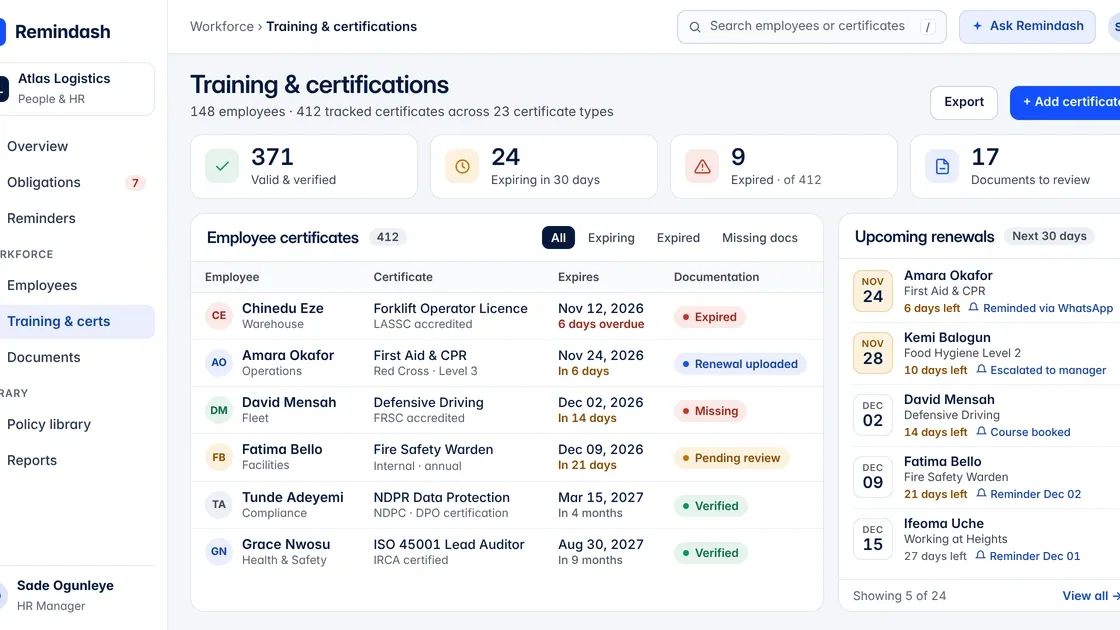
Remindash helps HR and compliance teams organize training and certification requirements, maintain employee documents and monitor expiration dates.
Its Training & Certification Tracking solution is designed around a practical workflow: requirement, employee, document, compliance check and reminder.
Remindash
1. Define the requirement
Start by identifying what employees must hold.
For example, your organization might establish a compliance policy requiring a particular employee group to maintain a valid first aid certificate.
The requirement should reflect the applicable law, contractual condition or approved internal policy.
2. Maintain employee records
Add employees as contacts of type Employee.
The employee record provides a place to maintain the relevant document and its information.
3. Upload the training certificate
Attach the certificate or supporting document to the employee's contact.
Record the document type, issue date, expiration date and file, where applicable.
If a requirement concerns an evaluation or refresher activity rather than a certificate expiration, track the appropriate due date or obligation separately.
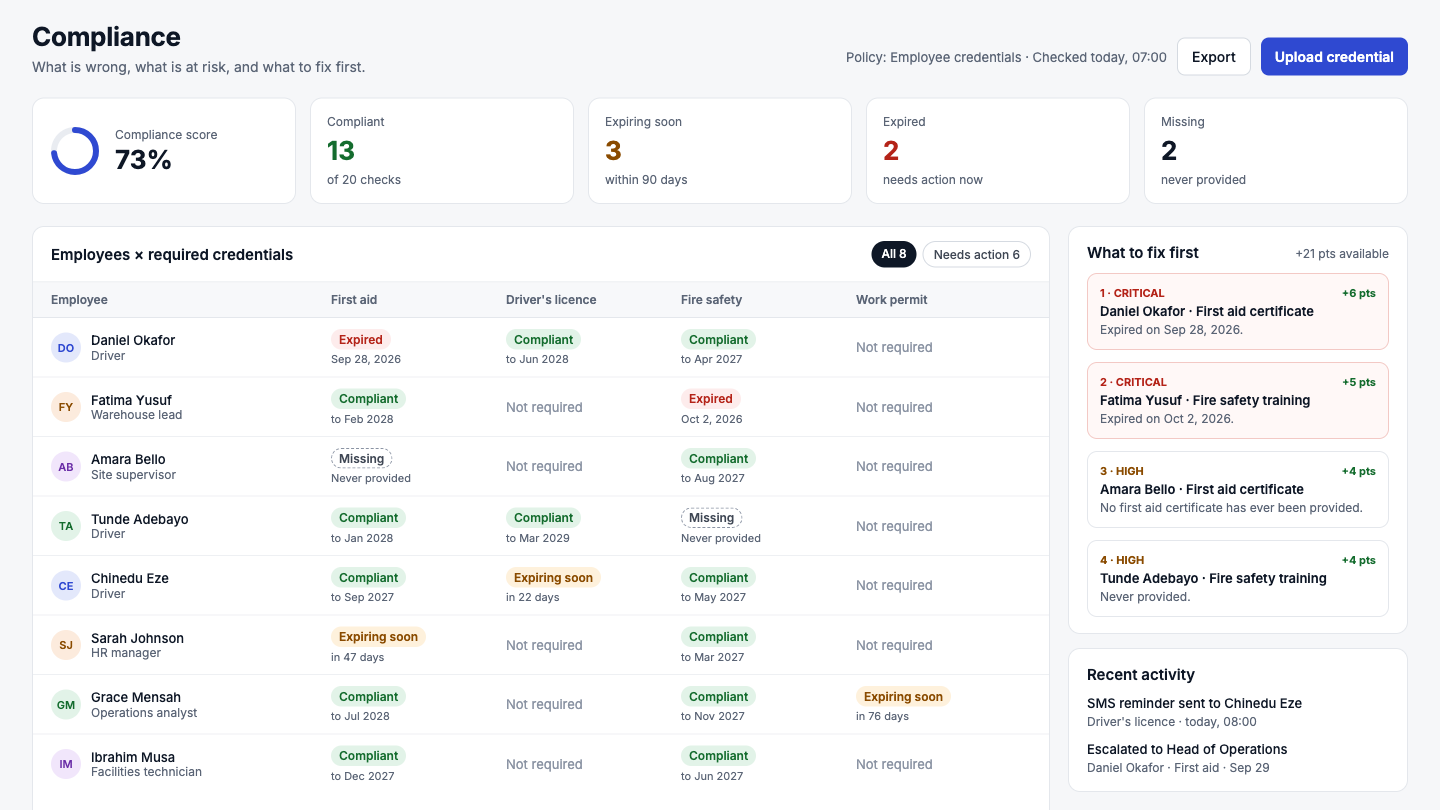
4. Review the compliance check
Remindash evaluates the employee's recorded document against the configured compliance policy.
The product can identify documentation as compliant, expiring soon, expired or missing.
For example, a missing first aid certificate can appear as a failing check.
An HR administrator can open the check, add the relevant document and allow the requirement to be evaluated again.
These checks reflect configured records and rules. They do not independently verify professional competence or legal authorization.
5. Configure renewal reminders
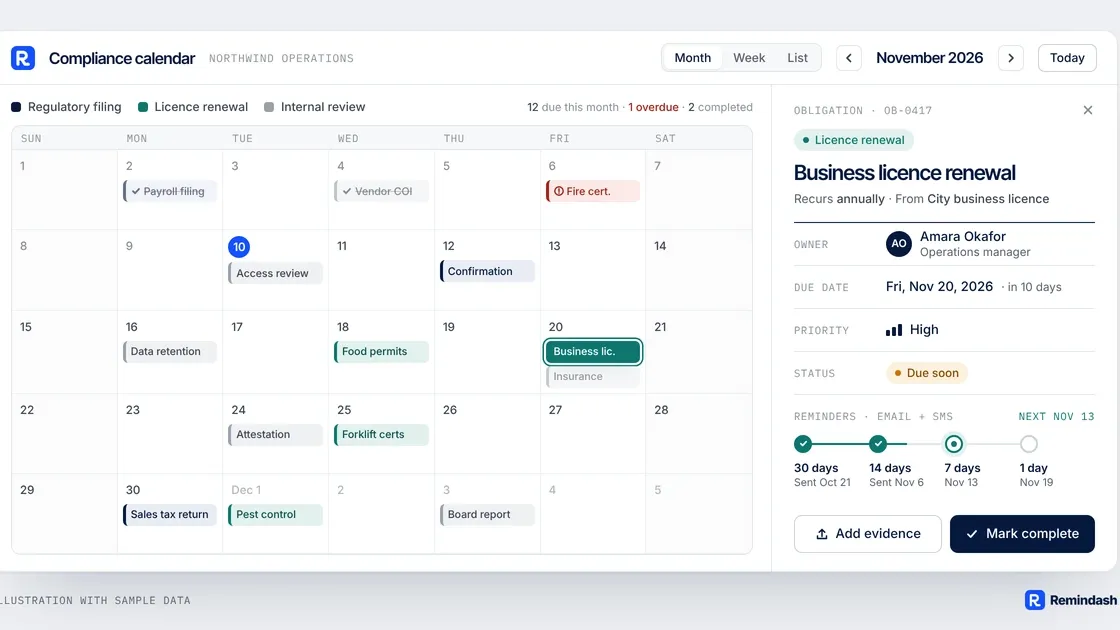
With Reminders & Sequences, HR can establish notification steps before relevant deadlines.
For example, an organization could notify the employee 60 days before a certificate expires, notify the manager at 30 days and escalate unresolved follow-up closer to the due date.
Supported notification channels include email, SMS and WhatsApp. Advanced sequences, channels and escalation availability depend on the organization's plan and configuration.
Remindash+1
6. Track outstanding actions
For activities such as periodic evaluations or required refresher training, Obligation Management can help assign an owner, due date and recurring schedule.
The organization can then monitor the responsibility and maintain its activity history.
7. Review updated evidence
Once renewed documentation is received, update the employee record and review the new status.
HR should confirm that the evidence satisfies the actual requirement before considering the matter resolved.
Remindash is not a learning management system or training provider. It does not host training courses or independently assess employees' practical competence. It helps organizations track requirements, documents, deadlines and follow-up responsibilities.
Training and Certification Tracking Checklist for HR
Use this checklist to review your process:
Have we identified the training and certifications required for each role?
Have we recorded the source of each requirement?
Do we distinguish certificate expiration from training completion and competency evaluation?
Can we identify employees who have never submitted required evidence?
Are completion dates, issue dates and applicable expiration dates recorded?
Have we assigned responsibility for renewals and refresher training?
Are reminders scheduled early enough to arrange the necessary action?
Do we track event-triggered retraining requirements?
Are documents reviewed before being accepted?
Do we retain historical evidence according to applicable requirements?
Do we reassess requirements when employees change roles or work activities change?
Common Employee Training Tracking Mistakes
Assuming every certificate expires annually
Different requirements follow different rules. Verify the relevant issuer, regulation or internal policy before establishing a renewal schedule.
Tracking only certificates already received
A register should identify employees who have not supplied required evidence.
Confusing course attendance with competence
Completion of a training session does not always establish that an employee is competent or authorized to perform a regulated task.
Using the same reminder schedule for every requirement
Some certifications require long lead times for external assessment or renewal.
Others may be addressed through shorter internal processes.
Overwriting old evidence
Replacing an old document without retaining required historical records may create recordkeeping problems.
Ignoring role changes
An employee who moves to a new role may need different training or qualifications.
Treating software status as a legal determination
A green or compliant status in a document tracker does not replace the employer's responsibility to verify actual requirements and competence.
Frequently Asked Questions
What is employee training expiration tracking?
It is the process of monitoring required employee training, certifications, evaluations and related dates to ensure that necessary follow-up is identified and completed.
Do all employee training certificates expire?
No. Some certificates have defined validity periods, while other training requirements depend on periodic evaluations, specific events or internal policies.
How often should HR review training records?
The appropriate frequency depends on the workforce and requirements. Regular operational reviews can help identify upcoming dates, while role changes and workplace events may require immediate attention.
Can Excel track training and certification expirations?
Yes. Excel can maintain training registers and expiration dates. Dedicated software may be useful when teams need automated reminders, document checks, ownership and activity history.
Is training expiration tracking the same as an LMS?
No. A learning management system generally focuses on course delivery and learning activities. A training expiration tracker focuses on requirements, evidence, dates and follow-up.
What happens when an employee's certification expires?
The organization should verify the applicable requirement, determine whether the employee remains authorized to perform the relevant work, and arrange the necessary renewal or assessment.
An expired document does not always establish the same legal outcome in every situation.
Can Remindash deliver employee training courses?
No. Remindash tracks training and certification requirements, documents and deadlines. It does not provide course delivery.
Final Thoughts: Make Training Requirements Visible Before They Become Problems
Employee training and certification tracking should do more than maintain a list of completed courses.
It should help HR teams understand what each role requires, identify missing evidence, monitor important dates and coordinate follow-up.
Begin with a clear training requirements register.
Connect each requirement to the relevant employees, maintain appropriate documentation and establish reminders based on actual deadlines.
Most importantly, distinguish between training completion, certification validity and demonstrated competence.
When every requirement has an owner, every important date is visible and every missing record has a follow-up action, training administration becomes more reliable.
Keep Employee Training and Certification Deadlines Organized With Remindash
Stop relying on scattered spreadsheets, inboxes and individual reminders to track employee training records.
With Remindash, your team can maintain employee certification documents, identify missing or expiring evidence, assign responsibilities and configure renewal reminders.
Explore Remindash Training & Certification Tracking and bring your HR documentation responsibilities into one organized workflow.
Get hands-on compliance support
Work with Remindash to turn requirements into an operational plan.
This article is general guidance, not legal advice. Which requirements apply depends on your circumstances; review official sources and obtain professional advice where appropriate.